import numpy as np
import pandas as pd
import matplotlib.pyplot as plt
from matplotlib.lines import Line2D
from matplotlib.patches import Patch
import geopandas as gpd
import shapely
from shapely.geometry import box
from scipy.spatial import cKDTree
from scipy.optimize import curve_fit
from scipy import stats
from statsmodels.stats.multitest import multipletests
from libpysal.weights import KNN, DistanceBand, Queen, Rook, min_threshold_distance
from esda.moran import Moran
from esda.getisord import G, G_Local
from matplotlib_scalebar.scalebar import ScaleBar

gpkg = "datasets/gisData/spatial_stats/spatial_stats.gpkg"13 Spatial Statistics
13.1 Topics Covered
- Point pattern analysis using average nearest neighbor
- Conceptualizing spatial relationships and defining spatial weights
- Global spatial autocorrelation using Moran’s I
- Characterizing spatial dependence across distances using semivariograms
- Multi-distance point pattern analysis using Ripley’s K and L functions
- Global clustering of high or low values using Getis-Ord General G
- Local hot spot analysis using Getis-Ord Gi*
- Mapping hot spot analysis results
13.2 Introduction
Many of the statistical methods discussed in this text assume that observations are independent. However, geospatial data rarely meet this assumption, as we saw in Chapter 6. As stated in Tobler’s First Law of Geography: “everything is related to everything else, but near things are more related than distant things.” Spatial statistics are methods that explicitly incorporate the locations of features, and the relationships between them, into the analysis. In this chapter, we explore a set of commonly used spatial statistics that address three related questions:
- Point pattern analysis: Are the locations of features clustered, dispersed, or random, and at what distances? We assess this using the average nearest neighbor (ANN) statistic and Ripley’s K function.
- Spatial autocorrelation: Are the attribute values of nearby features more similar (or more different) than would be expected by chance, and how does this similarity change with distance? We assess this using Moran’s I and semivariograms.
- Hot spot analysis: Do high or low attribute values cluster in space, and if so, where? We assess this globally using Getis-Ord General G and locally using Getis-Ord Gi*.
The first two questions are explored using an inventory of street trees in the city of Pittsburgh, Pennsylvania, USA. Specifically, we assess whether trees with a diameter at breast height (DBH) of at least 5 inches are clustered and whether DBH values are spatially autocorrelated. Hot spot analysis is then demonstrated using median household income for counties in the western United States.
We make use of the following libraries. GeoPandas (Chapter 9) is used to read and manipulate vector geospatial data. libpysal is used to define spatial weights, and esda (exploratory spatial data analysis) is used to calculate Moran’s I, General G, and Gi*. Both are part of the PySAL family of libraries for spatial analysis. The spatial module of SciPy provides a k-d tree, a data structure for quickly finding nearby points, which we use to calculate the distances needed for the point pattern analyses and semivariograms. Maps and graphs are generated with matplotlib.
13.3 Data Preparation
Both datasets are stored as layers in the spatial_stats.gpkg GeoPackage. The list_layers() function lists the layers in the file. The trees layer contains the tree inventory points while the west_counties layer contains county polygons.
print(gpd.list_layers(gpkg)) name geometry_type
0 trees Point
1 west_counties MultiPolygon
2 pittsburgh MultiPolygonWe read in the trees layer and then retain only trees with a DBH greater than or equal to 5 inches. The inventory also includes records for stumps, which are not living trees, so these are removed as well. The data use the NAD83 Pennsylvania South State Plane coordinate reference system, and the map units are US survey feet. All distances calculated from these data are, therefore, in feet.
trees = gpd.read_file(gpkg, layer="trees")
trees = trees[(trees["DBH"] >= 5) & (trees["SPP"] != "Stump")].reset_index(drop=True)

print(len(trees))22015print(trees.crs.axis_info[0].unit_name)US survey footprint(trees["DBH"].describe())count 22015.000000
mean 14.717692
std 8.066793
min 5.000000
25% 8.000000
50% 13.000000
75% 19.000000
max 62.000000
Name: DBH, dtype: float64fig, ax = plt.subplots(figsize=(9, 8))
trees.plot(ax=ax, column="DBH", scheme="quantiles", k=5, cmap="Greens", markersize=1,
legend=True, legend_kwds={"title": "DBH (in.)", "loc": "upper left",
"bbox_to_anchor": (1, 1)})
ax.set_title("Pittsburgh Street Trees (DBH >= 5 in.)")
ax.set_axis_off()
plt.show()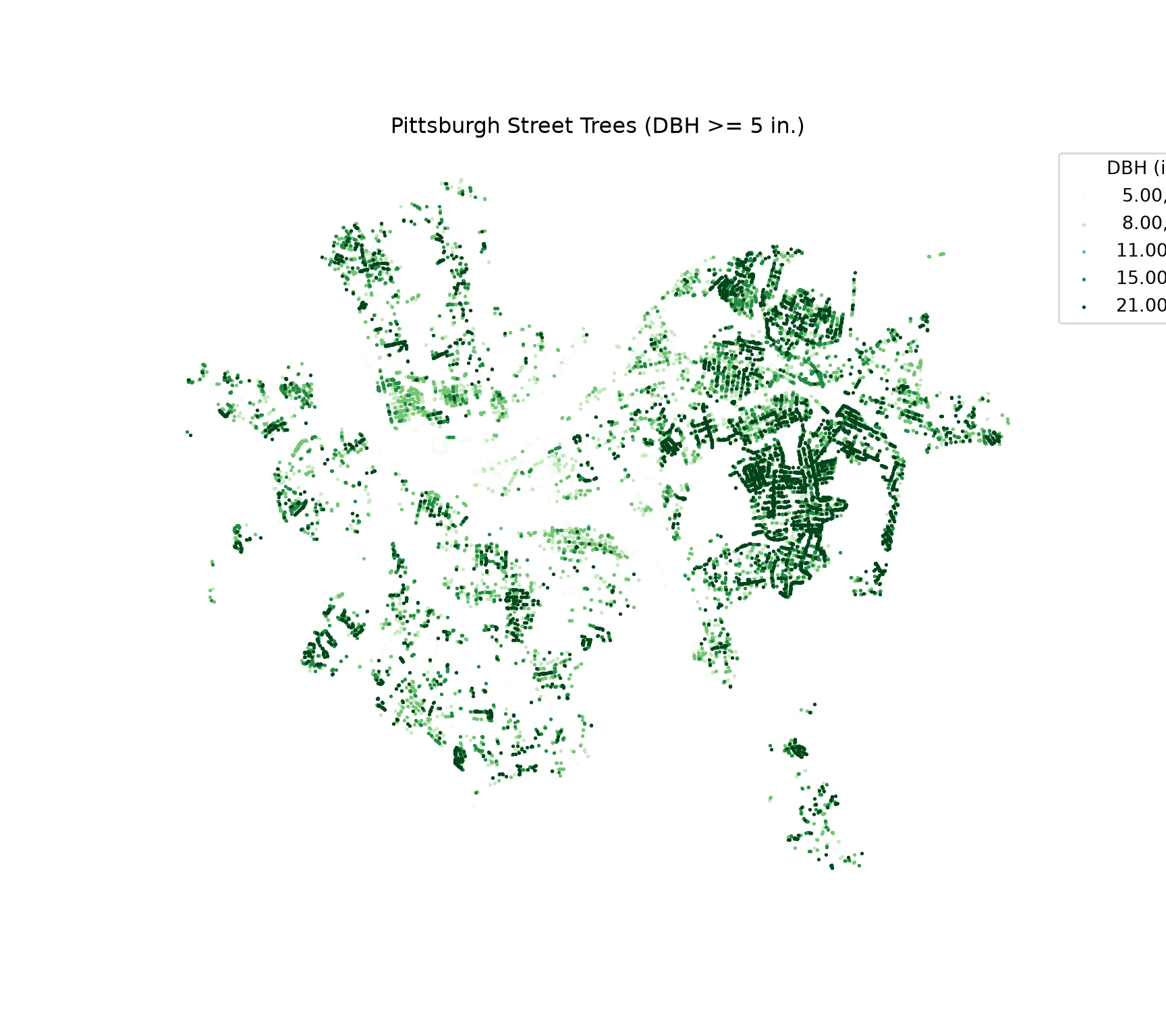
Next, we read in the west_counties layer. The “med_income” column is stored as an integer. We convert it to a floating point data type using astype(). This is a good habit since the General G calculation multiplies pairs of values together, and products of large integers can exceed the maximum value that some integer data types can store. These data use an Albers Equal Area Conic projection with map units of meters.
cnty = gpd.read_file(gpkg, layer="west_counties")
cnty["med_income"] = cnty["med_income"].astype("float64")

print(len(cnty))1502print(cnty.crs.axis_info[0].unit_name)metreprint(cnty["med_income"].describe())count 1502.000000
mean 43540.446738
std 9990.592889
min 19182.000000
25% 36896.500000
50% 42314.500000
75% 48218.750000
max 102602.000000
Name: med_income, dtype: float6413.4 Point Pattern Analysis: Average Nearest Neighbor
13.4.1 The Statistic
The average nearest neighbor statistic, also known as the Clark-Evans aggregation index, assesses whether a set of point locations is clustered, dispersed, or randomly distributed. Note that only the locations of the points are considered, not their attributes. The calculation proceeds as follows:
- For each point, calculate the distance to its nearest neighbor.
- Calculate the observed mean nearest neighbor distance (\(\bar{D}_O\)) as the average of these distances.
- Calculate the expected mean nearest neighbor distance (\(\bar{D}_E\)) under complete spatial randomness (CSR) for the same number of points (\(n\)) within the same study area (\(A\)): \(\bar{D}_E = \frac{0.5}{\sqrt{n/A}}\).
- Calculate the nearest neighbor ratio: \(R = \bar{D}_O / \bar{D}_E\).
If \(R\) is less than 1, the points are closer together than expected under CSR, which suggests clustering. If \(R\) is greater than 1, the points are farther apart than expected, which suggests dispersion, or a regular pattern. If \(R\) is approximately 1, the pattern is consistent with randomness. Statistical significance is assessed using a z-score, \(z = (\bar{D}_O - \bar{D}_E)/SE\), where the standard error is \(SE = \frac{0.26136}{\sqrt{n^2/A}}\). The null hypothesis is that the points are randomly distributed.
The ANN statistic is very sensitive to the defined study area. Since \(\bar{D}_E\) depends on point density (\(n/A\)), a larger study area produces a larger expected distance and, therefore, a stronger indication of clustering, even if the points themselves are unchanged. Ideally, the study area should be the actual area in which points could occur, such as the city boundary.
13.4.2 Calculating ANN
We can define the study area using the provided pittsburgh layer, which is a polygon boundary for the entire city dissolved to a single feature. To assess the impact of changing the study area size or definition, we also use the convex hull of the trees, which is the smallest convex polygon that contains all the points, and the bounding box of the trees. The convex hull is calculated by merging all points into a single MultiPoint geometry with union_all() and then using the convex_hull property. We generate the bounding box of the points using the total_bounds property and box() from Shapely.
pitt_bound = gpd.read_file(gpkg, layer="pittsburgh")

hull = trees.union_all().convex_hull
bbx = box(*trees.total_bounds)

fig, ax = plt.subplots(figsize=(9, 8))
trees.plot(ax=ax, color="darkgreen", markersize=0.2)
pitt_bound.boundary.plot(ax=ax, color="orange", linewidth=2)
gpd.GeoSeries([bbx], crs=trees.crs).boundary.plot(ax=ax, color="red", linewidth=2)
gpd.GeoSeries([hull], crs=trees.crs).boundary.plot(ax=ax, color="blue", linewidth=2)
ax.legend(handles=[Line2D([], [], color=c, linewidth=2, label=l) for c, l in
                   [("orange", "City Boundary"), ("red", "Bounding Box"), ("blue", "Convex Hull")]],
          title="Study Area", loc="upper left", bbox_to_anchor=(1, 1))
ax.set_axis_off()
plt.show()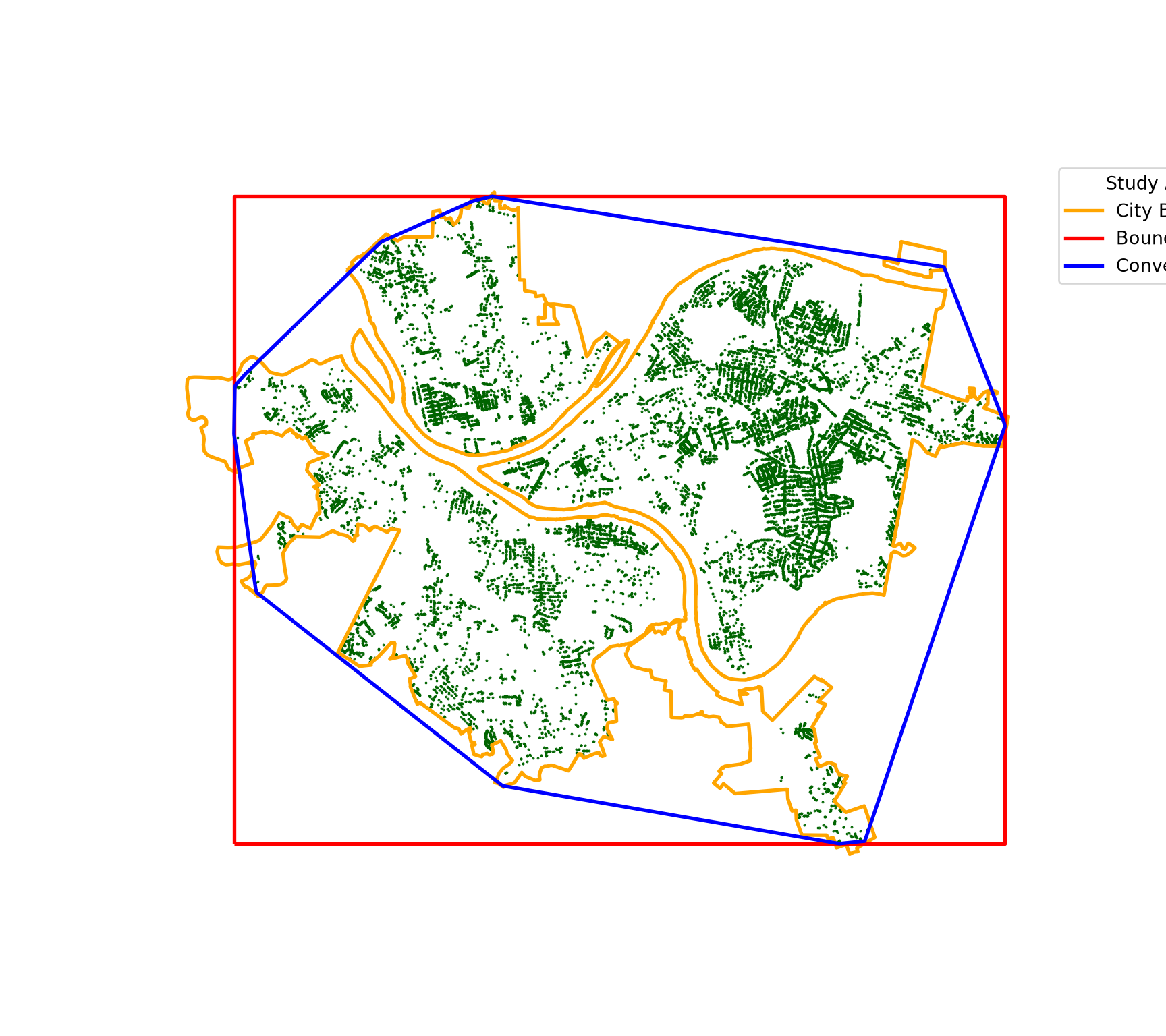
To calculate nearest neighbor distances, we build a k-d tree from the point coordinates using cKDTree() from SciPy. The query() method then returns the distances to the closest k points. Since the closest point to each point is the point itself (at a distance of zero), we request two neighbors and keep the second.
tree_xy = trees.get_coordinates().to_numpy()
kd = cKDTree(tree_xy)

nn_d = kd.query(tree_xy, k=2)[0][:, 1]
print(pd.Series(nn_d).describe())
count 22015.000000
mean 50.534506
std 63.181827
min 0.294282
25% 24.652816
50% 34.043675
75% 49.315317
max 1454.563145
dtype: float64We now write a small function to calculate the ANN statistic from an array of nearest neighbor distances and a study area. The function returns the observed and expected mean distances, the nearest neighbor ratio, the z-score, and the associated two-sided p-value obtained from the standard normal distribution.
def ann_calc(nn_d, area):
    n = len(nn_d)
    d_obs = nn_d.mean()
    d_exp = 0.5 / np.sqrt(n / area)
    se = 0.26136 / np.sqrt(n**2 / area)
    z = (d_obs - d_exp) / se
    return {"obs_dist": d_obs, "exp_dist": d_exp, "nn_ratio": d_obs / d_exp,
            "z_score": z, "p_value": 2 * stats.norm.sf(abs(z))}
The function is applied using all three study area definitions. The observed mean nearest neighbor distance is the same in each case. However, the expected distance, and therefore the ratio and z-score, change with the study area.
ann = pd.DataFrame([ann_calc(nn_d, pitt_bound.area.sum()),
                    ann_calc(nn_d, hull.area),
                    ann_calc(nn_d, bbx.area)],
                   index=["City Boundary", "Convex Hull", "Bounding Box"])
print(ann)
obs_dist exp_dist nn_ratio z_score p_value
City Boundary 50.534506 132.863442 0.380349 -175.888413 0.0
Convex Hull 50.534506 159.273796 0.317281 -193.790458 0.0
Bounding Box 50.534506 185.039351 0.273101 -206.330799 0.0Using any of the three study area definitions, the nearest neighbor ratio is well below 1, and the z-score is very large and negative. So, we reject the null hypothesis of complete spatial randomness and conclude that trees with a DBH of at least 5 inches are significantly clustered. This is not surprising: street trees are planted along streets, and many streets in the inventory have closely spaced trees, while large areas, such as buildings, yards, parks, and rivers, have no street trees at all.
The pointpats library, which is also part of PySAL, provides additional tools for point pattern analysis, including nearest neighbor statistics and Ripley’s functions. Writing the calculations ourselves, as we do in this chapter, makes it clear what each statistic measures.
13.5 Conceptualizing Spatial Relationships
ANN only considers point locations. The remaining statistics in this chapter consider attribute values and how they relate to the values of neighboring features. This requires defining which features are neighbors and how much influence each neighbor has. This is known as the conceptualization of spatial relationships, and it is represented using a spatial weights matrix (\(W\)). For \(n\) features, \(W\) is an \(n \times n\) matrix in which the value \(w_{ij}\) represents the relationship between feature \(i\) and feature \(j\). A value of 0 indicates that the features are not neighbors.
Common conceptualizations are described in Table 13.1. In libpysal, each conceptualization is implemented as a class that creates a weights (W) object, which stores the neighbors of each feature and the associated weights. Weights can be created from a GeoDataFrame using the from_dataframe() method or from an array of coordinates using the from_array() method.
| Conceptualization | Description | libpysal | Considerations |
|---|---|---|---|
| Queen Contiguity | Polygons that share an edge or a vertex (corner) are neighbors | Queen.from_dataframe() | Polygon data only; features with no shared boundary (e.g., islands) have no neighbors; number of neighbors varies with feature size and shape |
| Rook Contiguity | Polygons that share an edge are neighbors; sharing only a vertex is not sufficient | Rook.from_dataframe() | Polygon data only; generally results in fewer neighbors than queen contiguity |
| k-Nearest Neighbors | The k closest features are neighbors | KNN.from_array(k=) | Every feature has exactly k neighbors; neighbor distances vary with feature density; relationships are not necessarily symmetric |
| Fixed Distance Band | All features within a specified distance are neighbors and receive equal weight | DistanceBand.from_array(threshold=, binary=True) | Distance defines the scale of analysis; dense areas have many neighbors while sparse areas may have none |
| Inverse Distance | Features within a specified distance are neighbors; weights decrease as distance increases | DistanceBand.from_array(threshold=, binary=False, alpha=-1) | Nearby features have more influence; the decay can be made steeper using inverse distance squared (alpha=-2) |
| Self-Inclusion | The feature is included as its own neighbor | G_Local(star=True) | Required for the Getis-Ord Gi* statistic as opposed to Gi |
The transform property of a weights object determines how the weights are coded. The two most common options are:
-
"B": binary weights; each neighbor receives a weight of 1 -
"R": row standardized weights; the weights for each feature are divided by the sum of its weights so that they sum to 1. This prevents features with many neighbors from having more influence than features with few neighbors.
The "O" option restores the original weights, such as inverse distances.
If any feature has no neighbors, which is called an island, libpysal issues a warning, and the islands property lists the affected features. Islands are effectively excluded from the analysis since they have no neighbors to compare with.
There is no single correct conceptualization. The choice should reflect how you believe the process being studied operates in space, and it sets the scale of the analysis. As we demonstrate below, different conceptualizations can result in different conclusions, so it is good practice to explore multiple options and to report the one used.
13.6 Global Spatial Autocorrelation: Moran’s I
13.6.1 The Statistic
Spatial autocorrelation describes the degree to which attribute values at nearby locations are similar. Positive spatial autocorrelation occurs when nearby features have similar values, negative spatial autocorrelation occurs when nearby features have dissimilar values, and the absence of spatial autocorrelation indicates that values are randomly arranged in space.
Moran’s I is the most commonly used measure of global spatial autocorrelation. It is calculated as:
\[I = \frac{n}{\sum_{i}\sum_{j} w_{ij}} \frac{\sum_{i}\sum_{j} w_{ij}(x_i - \bar{x})(x_j - \bar{x})}{\sum_{i}(x_i - \bar{x})^2}\]
where \(x_i\) is the value at feature \(i\), \(\bar{x}\) is the mean of all values, and \(w_{ij}\) is the spatial weight between features \(i\) and \(j\). Conceptually, it is similar to a correlation coefficient between each value and the values of its neighbors. Values of \(I\) greater than the expected value under the null hypothesis, \(E[I] = -1/(n-1)\), which is close to zero for large \(n\), indicate positive spatial autocorrelation, while values less than \(E[I]\) indicate negative spatial autocorrelation. Significance can be assessed analytically, using a z-score, or using a permutation test, in which the observed values are randomly shuffled among the locations many times to generate a reference distribution for \(I\).
Note that Moran’s I is a global statistic. It summarizes the entire study area with a single value and does not indicate where clustering occurs. Also, it does not distinguish between clusters of high values and clusters of low values: both contribute to positive spatial autocorrelation.
13.6.2 Calculating Moran’s I
Since the data are points, contiguity is not applicable. We begin by defining neighbors as the 8 nearest trees using KNN.from_array() and generate row-standardized weights by setting the transform property to “R”. The Moran class from esda then calculates Moran’s I. The z_rand and p_rand properties provide the analytical z-score and p-value. Setting permutations=999 also performs a permutation test with 999 random permutations, and the resulting pseudo p-value is stored in p_sim. Since esda uses the random number generator of NumPy, we set the random seed so that the results are reproducible.
w_k8 = KNN.from_array(tree_xy, k=8)
w_k8.transform = "R"

np.random.seed(42)
mi = Moran(trees["DBH"], w_k8, permutations=999)
print(f"Moran's I = {mi.I:.4f}, expected I = {mi.EI:.6f}")
Moran's I = 0.4095, expected I = -0.000045print(f"Analytical: z = {mi.z_rand:.2f}, p = {mi.p_rand:.3g}")Analytical: z = 128.74, p = 0print(f"Permutation: pseudo p = {mi.p_sim:.3f}")Permutation: pseudo p = 0.001The Moran’s I value is much larger than the expected value, and the p-value is extremely small. So, we conclude that DBH is positively spatially autocorrelated: trees with large DBH values tend to be located near other trees with large DBH values, and small trees tend to be located near other small trees. This makes sense since trees along the same street are often planted at the same time and with the same species. The pseudo p-value from the permutation test is 0.001, the smallest possible value with 999 permutations, since the observed value was larger than all the values obtained from the permutations.
13.6.3 Impact of the Conceptualization
We now explore how the choice of spatial relationships impacts the result. In the first code block below, we calculate Moran’s I using 4, 8, 16, and 32 nearest neighbors. We set permutations=0 to skip the permutation test, since we only need the analytical results, and store the results in a DataFrame.
moran_k = []
for k in [4, 8, 16, 32]:
    w = KNN.from_array(tree_xy, k=k)
    w.transform = "R"
    m = Moran(trees["DBH"], w, permutations=0)
    moran_k.append({"conceptualization": f"{k} Nearest Neighbors",
                    "morans_i": m.I, "z_score": m.z_rand})
print(pd.DataFrame(moran_k))
conceptualization morans_i z_score
0 4 Nearest Neighbors 0.460584 102.798851
1 8 Nearest Neighbors 0.409494 128.740954
2 16 Nearest Neighbors 0.342728 151.855664
3 32 Nearest Neighbors 0.284065 177.389769Next, we use fixed distance bands of 250, 500, and 1,000 feet using DistanceBand.from_array(), where threshold defines the maximum distance. With a fixed distance band, isolated trees may have no neighbors. So, we record the number of trees without neighbors, obtained from the islands property, and the mean number of neighbors per tree, obtained from the mean_neighbors property. Setting silence_warnings=True suppresses the warning about islands.
moran_d = []
for d in [250, 500, 1000]:
    w = DistanceBand.from_array(tree_xy, threshold=d, binary=True, silence_warnings=True)
    n_islands, mean_nb = len(w.islands), w.mean_neighbors
    w.transform = "R"
    m = Moran(trees["DBH"], w, permutations=0)
    moran_d.append({"conceptualization": f"{d} ft Distance Band", "morans_i": m.I,
                    "z_score": m.z_rand, "no_neighbors": n_islands, "mean_neighbors": mean_nb})
print(pd.DataFrame(moran_d))
conceptualization morans_i z_score no_neighbors mean_neighbors
0 250 ft Distance Band 0.407366 107.623795 461 11.432296
1 500 ft Distance Band 0.302206 135.544470 69 35.774154
2 1000 ft Distance Band 0.235677 190.795048 4 109.426936Lastly, we use inverse distance weighting within 500 feet. Setting binary=False and alpha=-1 assigns each neighbor a weight equal to the inverse of its distance. As a result, closer trees have a larger influence than more distant trees. The weights are then row standardized.
w_idw = DistanceBand.from_array(tree_xy, threshold=500, binary=False, alpha=-1.0,
                                silence_warnings=True)
w_idw.transform = "R"

m = Moran(trees["DBH"], w_idw, permutations=0)
print(f"Moran's I = {m.I:.4f}, z = {m.z_rand:.2f}")
Moran's I = 0.3927, z = 123.41All of the conceptualizations indicate significant positive spatial autocorrelation. However, the magnitude of Moran’s I changes. As the neighborhood is expanded, from 4 to 32 nearest neighbors or from 250 to 1,000 feet, Moran’s I decreases. This indicates that DBH values are most similar among trees that are very close to each other and that the similarity weakens with distance. The inverse distance result, which emphasizes the closest neighbors, is similar to the results for small neighborhoods. Note also that the z-scores increase as the neighborhood expands even though Moran’s I decreases. With very large samples, nearly any amount of spatial autocorrelation will be statistically significant, so it is important to consider the magnitude of the statistic and not just its significance.
13.7 Semivariograms
13.7.1 Conceptualization
The Moran’s I results above suggest that the similarity between DBH values depends on the distance between trees. A semivariogram describes this relationship directly. Instead of summarizing spatial autocorrelation with a single value for one neighborhood definition, it characterizes how the dissimilarity between values changes as the distance between observations increases.
The semivariogram is based on pairs of observations. All pairs of points are grouped into lag bins based on the distance between them (Figure 13.1, left). For example, using a lag width of 100 feet, the first bin contains all pairs separated by 0 to 100 feet, the second bin contains all pairs separated by 100 to 200 feet, and so on. For each bin, the semivariance is calculated as:
\[\gamma(h) = \frac{1}{2N(h)}\sum_{i=1}^{N(h)} \left(z(x_i) - z(x_i + h)\right)^2\]
where \(h\) is the lag distance, \(N(h)\) is the number of pairs in the lag bin, and \(z(x_i)\) and \(z(x_i + h)\) are the values of the two points in each pair. In other words, the semivariance is half of the average squared difference between the values of pairs separated by approximately distance \(h\). Plotting the semivariance for each lag bin against the lag distance results in the empirical semivariogram (Figure 13.1, right).
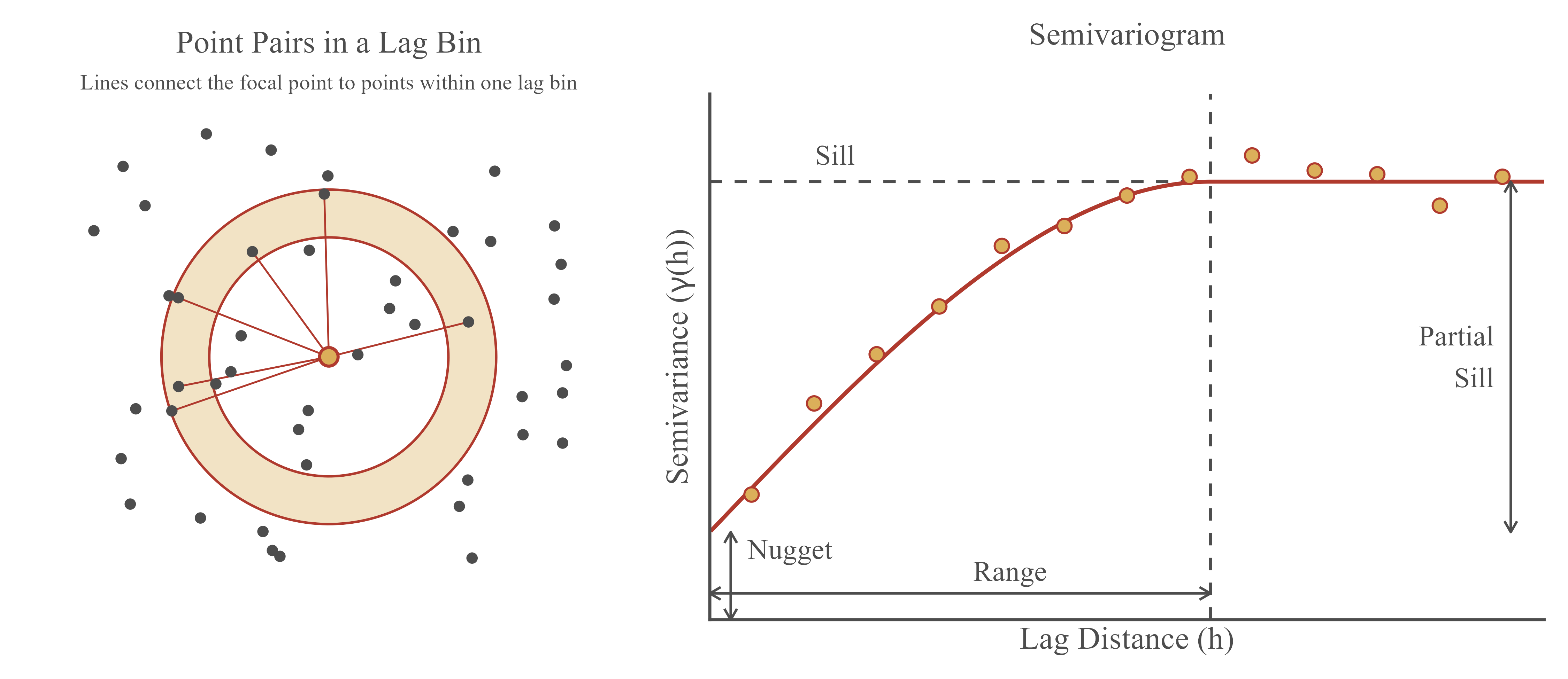
If the data are positively spatially autocorrelated, pairs of nearby points will have similar values and, therefore, a small semivariance. As the distance increases, values become less similar, and the semivariance increases. Eventually, the semivariance levels off once the distance is large enough that the values are no longer related. A semivariogram is described using the following components:
- Nugget: the semivariance at a distance of zero, or the y-intercept. In theory, two observations at the same location should have the same value, so the nugget should be zero. In practice, a non-zero nugget results from measurement error and variability that occurs at distances shorter than the smallest distance between samples.
- Sill: the semivariance at which the semivariogram levels off. This is generally close to the variance of the data.
- Partial sill: the sill minus the nugget. This represents the portion of the variability that is spatially structured.
- Range: the distance at which the semivariogram reaches the sill. Observations separated by more than the range are not spatially autocorrelated.
Since the empirical semivariogram is only calculated at a set of discrete lag distances, a continuous semivariogram model is generally fit to the empirical values. Common models include the spherical, exponential, and Gaussian models, which differ in the shape of the curve as it approaches the sill. For example, the spherical model reaches the sill at the range while the exponential model only approaches the sill asymptotically. For the exponential model, the practical or effective range, at which 95% of the sill is reached, is three times the range parameter. Fitted semivariogram models are used to characterize spatial structure and are a required input for the spatial interpolation method kriging.
The semivariogram assumes that the data are stationary: the mean and the spatial dependence are the same throughout the study area, and spatial dependence is only a function of the distance between observations, not their locations. It is also common to assume that the dependence is isotropic, or the same in all directions. Below, we check this assumption using directional semivariograms.
13.7.2 Calculating the Empirical Semivariogram
The scikit-gstat and PyKrige libraries provide tools for semivariogram modeling and kriging. However, they calculate the distances between all pairs of points, which is not practical for more than 22,000 trees (over 240 million pairs). Since we only need pairs separated by up to 3,000 feet, we instead use the query_pairs() method of the k-d tree, which efficiently finds all pairs of points within a given distance. The result is an array with one row for each pair, containing the indexes of the two points. We then calculate the distance between the points in each pair and half of the squared difference between their DBH values.
dbh = trees["DBH"].to_numpy()
pairs = kd.query_pairs(r=3000, output_type="ndarray")
dxy = tree_xy[pairs[:, 1]] - tree_xy[pairs[:, 0]]
pair_d = np.hypot(dxy[:, 0], dxy[:, 1])
pair_sv = 0.5 * (dbh[pairs[:, 0]] - dbh[pairs[:, 1]]) ** 2
print(len(pairs))7249689We then write a function that assigns each pair to a lag bin and calculates the number of pairs (np), the average distance between pairs (dist), and the semivariance (gamma) for each bin using np.bincount(), which sums values by bin. The result is a DataFrame with one row per lag bin. We use a lag width of 100 feet and a maximum distance, or cutoff, of 3,000 feet.
def empirical_variogram(d, sv, width=100, cutoff=3000):
    """Bin pairs by distance and calculate the semivariance of each lag bin."""
    keep = d < cutoff
    lag = (d[keep] // width).astype(int)
    n = np.bincount(lag, minlength=int(cutoff // width))
    with np.errstate(invalid="ignore"):
        return pd.DataFrame({"np": n,
                             "dist": np.bincount(lag, weights=d[keep]) / n,
                             "gamma": np.bincount(lag, weights=sv[keep]) / n}).dropna()

dbh_vgm = empirical_variogram(pair_d, pair_sv)
print(dbh_vgm.head())
np dist gamma
0 42280 57.644294 31.417987
1 51556 151.293303 43.748419
2 73931 254.405252 47.889005
3 107546 351.528633 53.630293
4 118471 450.493737 55.306003print(dbh.var(ddof=1))65.0731561178389213.7.3 Fitting a Semivariogram Model
We define functions for the exponential, spherical, and Gaussian models, each with a nugget, partial sill, and range parameter. The models are fit to the empirical semivariogram using curve_fit() from SciPy, which uses least squares. Similar to the R gstat package, the lag bins are weighted by the number of pairs divided by the squared distance, so bins with more pairs and shorter distances have more influence. In curve_fit(), weights are provided as uncertainties (sigma), which are the inverse of the square root of the weights. Initial values for the nugget, partial sill, and range are estimated from the data, and all parameters are constrained to be positive. The model with the smallest weighted sum of squared errors is selected.
def exp_model(h, nugget, psill, rng):
    return nugget + psill * (1 - np.exp(-h / rng))

def sph_model(h, nugget, psill, rng):
    hr = np.minimum(h / rng, 1)
    return nugget + psill * (1.5 * hr - 0.5 * hr**3)

def gau_model(h, nugget, psill, rng):
    return nugget + psill * (1 - np.exp(-(h / rng) ** 2))

models = {"Exponential": exp_model, "Spherical": sph_model, "Gaussian": gau_model}
h, gam, npairs = dbh_vgm["dist"], dbh_vgm["gamma"], dbh_vgm["np"]
sigma = 1 / np.sqrt(npairs / h**2)
p0 = [gam.iloc[0], gam.max() - gam.iloc[0], 1000]

fits = {}
for name, f in models.items():
    params, _ = curve_fit(f, h, gam, p0=p0, sigma=sigma, bounds=(0, np.inf), maxfev=10000)
    wsse = np.sum(npairs / h**2 * (gam - f(h, *params)) ** 2)
    fits[name] = {"nugget": params[0], "psill": params[1], "range": params[2], "wsse": wsse}

fit_table = pd.DataFrame(fits).T.sort_values("wsse")
print(fit_table)
nugget psill range wsse
Exponential 22.364940 38.192330 209.490026 26.170380
Spherical 25.903112 33.140675 491.120887 64.239996
Gaussian 29.756821 28.726077 218.771816 78.303817The exponential model provides the best fit. The nugget, partial sill, and range parameter are stored in the first row of the table. To plot the result, we calculate the fitted model values at a sequence of distances.
best = fit_table.iloc[0]
h_seq = np.linspace(0, 3000, 300)

fig, ax = plt.subplots(figsize=(8, 5))
ax.plot(h_seq, models[fit_table.index[0]](h_seq, best["nugget"], best["psill"], best["range"]),
        color="#B03A2E", linewidth=2)
ax.scatter(dbh_vgm["dist"], dbh_vgm["gamma"], color="black")
ax.axhline(dbh.var(ddof=1), linestyle="--", color="grey")
ax.set_xlabel("Lag Distance (ft)")
ax.set_ylabel("Semivariance")
plt.show()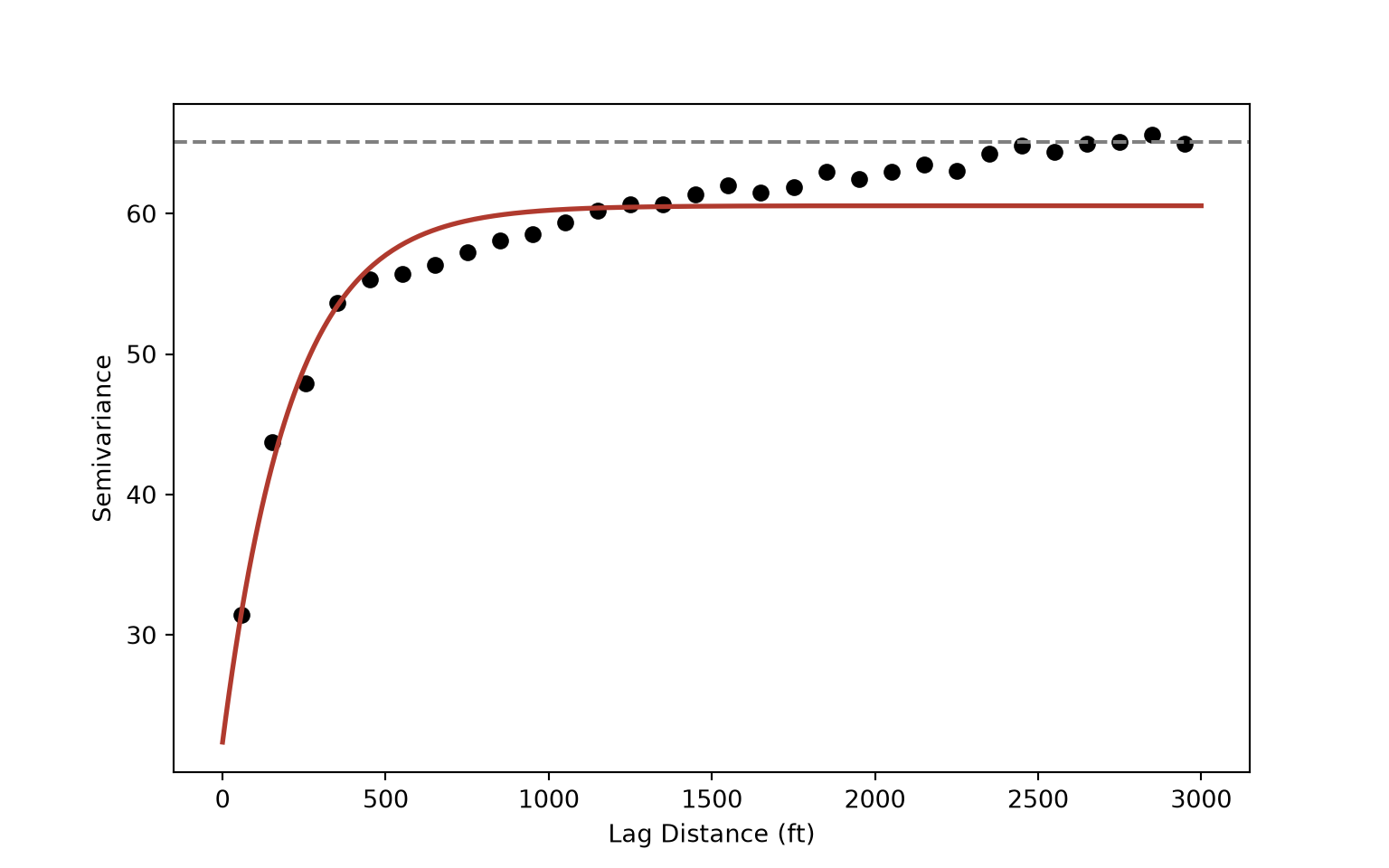
print(f"Sill = {best['nugget'] + best['psill']:.1f}; practical range = {3 * best['range']:.0f} ft")Sill = 60.6; practical range = 628 ftThe fitted model indicates a substantial nugget, with the semivariance increasing quickly over short distances before leveling off. The practical range, three times the range parameter for the exponential model, suggests that the DBH of trees within several hundred feet of each other are spatially autocorrelated, with the strongest similarity occurring at short distances. This is consistent with the Moran’s I results, where the statistic decreased as the neighborhood expanded. The relatively large nugget indicates that a substantial portion of the variability in DBH occurs at very short distances. Neighboring trees on the same street can differ substantially in size, for example when a dead tree is replaced with a new planting.
Note that the empirical semivariance continues to slowly increase beyond the practical range and approaches the variance of the data (dashed line). This suggests that there may be a weaker, broader scale component of spatial variation, such as differences between neighborhoods, in addition to the shorter range autocorrelation captured by the model.
13.7.4 Directional Semivariograms
To assess whether spatial autocorrelation differs by direction, we can calculate directional semivariograms. Here, we calculate semivariograms for four directions: 0° (north-south), 45° (northeast-southwest), 90° (east-west), and 135° (northwest-southeast). The direction of each pair is calculated in degrees clockwise from north using np.arctan2(). Since a pair oriented at 10° is also oriented at 190°, the directions are reduced to the range of 0° to 180° using the modulo operator (%). Only pairs whose orientation falls within 22.5° of each direction are included in each semivariogram.
pair_dir = np.degrees(np.arctan2(dxy[:, 0], dxy[:, 1])) % 180

fig, axs = plt.subplots(2, 2, figsize=(9, 7), sharex=True, sharey=True)
for ax, direction in zip(axs.flat, [0, 45, 90, 135]):
    diff = np.abs((pair_dir - direction + 90) % 180 - 90)
    sel = diff <= 22.5
    v = empirical_variogram(pair_d[sel], pair_sv[sel])
    ax.scatter(v["dist"], v["gamma"], color="black", s=12)
    ax.set_title(f"{direction}°")
for ax in axs[1]:
    ax.set_xlabel("Lag Distance (ft)")
for ax in axs[:, 0]:
    ax.set_ylabel("Semivariance")
plt.tight_layout()
plt.show()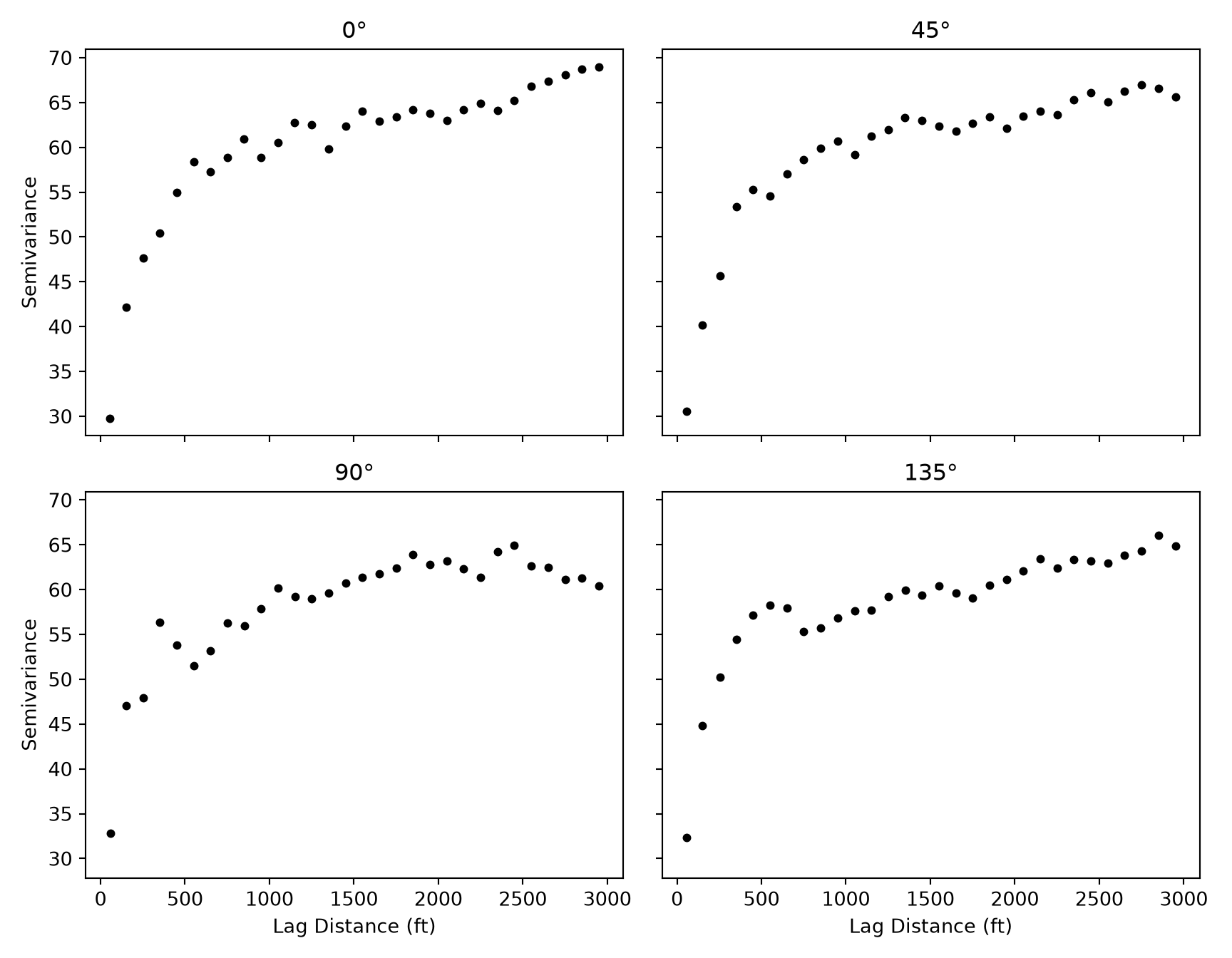
The four directional semivariograms have a broadly similar shape, nugget, and range. So, it is reasonable to assume that spatial autocorrelation in DBH is approximately isotropic. If the semivariograms differed substantially by direction, the spatial dependence would be anisotropic, and an anisotropic model could be defined.
13.8 Ripley’s K
13.8.1 Conceptualization
The average nearest neighbor statistic indicated that the trees are clustered. However, it only considers the distance from each point to its single nearest neighbor and, therefore, only characterizes the pattern at a very fine scale. A pattern can be clustered at one scale and random or dispersed at another. Ripley’s K function assesses clustering or dispersion across a range of distances. Similar to ANN, and in contrast to the semivariogram, it only considers the locations of the points and not their attributes.
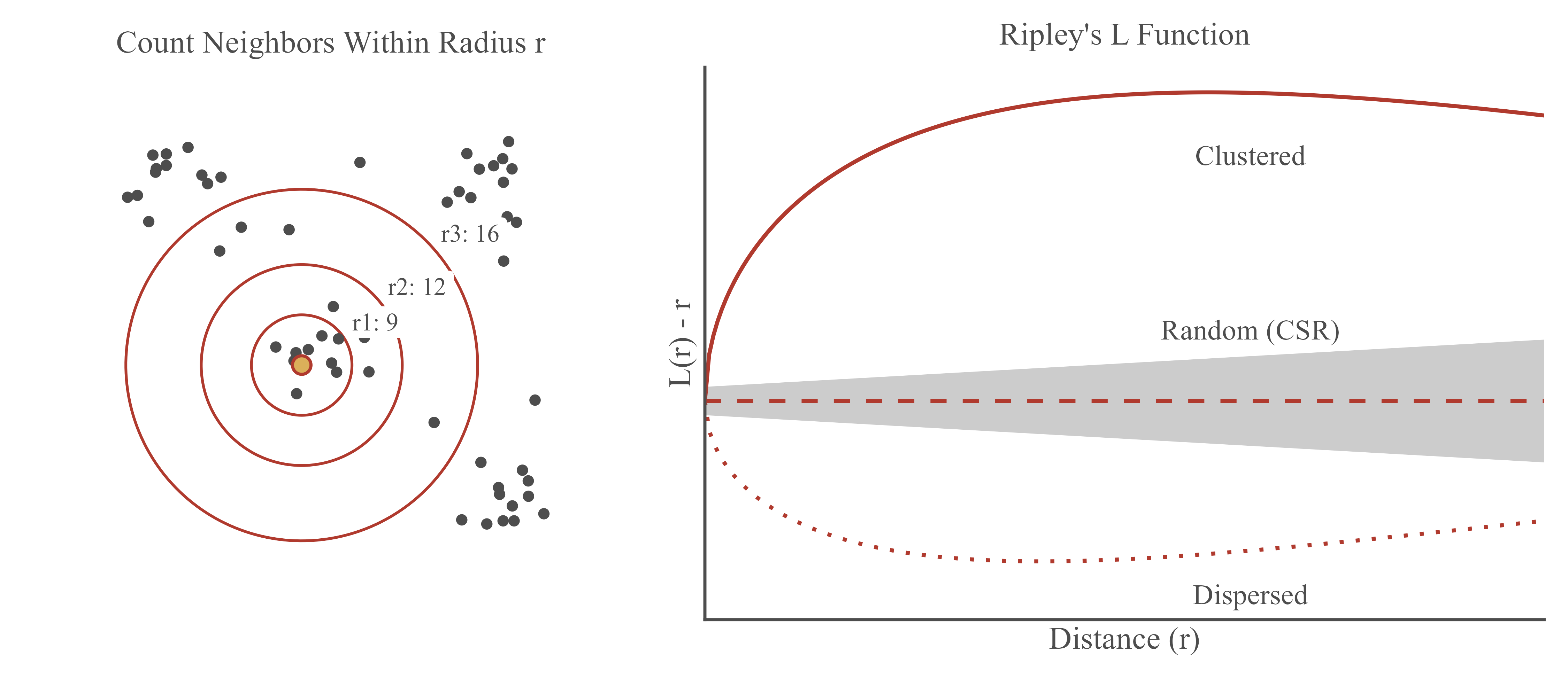
Conceptually, a circle of radius \(r\) is drawn around each point, and the number of other points within the circle is counted (Figure 13.2, left). This is repeated for each point and for a series of increasing radii. For each radius, the K function is calculated as:
\[K(r) = \frac{A}{n^2}\sum_{i}\sum_{j \neq i} I(d_{ij} \leq r)\]
where \(A\) is the study area, \(n\) is the number of points, \(d_{ij}\) is the distance between points \(i\) and \(j\), and \(I()\) is an indicator function that equals 1 if the distance is less than or equal to \(r\) and 0 otherwise. In other words, \(K(r)\) is the average number of other points within distance \(r\) of a point, divided by the overall density of points (\(n/A\)).
Under complete spatial randomness, the expected value of \(K(r)\) is the area of a circle with radius \(r\): \(\pi r^2\). If the observed \(K(r)\) is greater than \(\pi r^2\), there are more points within distance \(r\) than expected, which indicates clustering at that distance. If it is less than \(\pi r^2\), there are fewer points than expected, which indicates dispersion.
Since \(K(r)\) increases with the square of the distance, it is difficult to interpret visually. So, it is common to use the transformed L function, \(L(r) = \sqrt{K(r)/\pi}\), which equals \(r\) under CSR. Plotting \(L(r) - r\) against \(r\) results in a horizontal line at zero for a random pattern. Values above zero indicate clustering while values below zero indicate dispersion (Figure 13.2, right).
To assess statistical significance, simulation envelopes are generated. A large number of random point patterns with the same number of points and the same study area are simulated, and the L function is calculated for each. The highest and lowest simulated values at each distance define an envelope that represents the variability expected under CSR. Observed values above the envelope indicate significant clustering, and those below indicate significant dispersion.
Points near the edge of the study area have part of their circle outside of the study area, where no points can be observed. This causes \(K(r)\) to be underestimated, especially at large distances. Several edge corrections are available to account for this. The border correction, which we use below, only uses points that are at least distance \(r\) from the edge of the study area as the centers of the circles.
13.8.2 Calculating Ripley’s K and L
We use the city boundary as the study area. To apply the border correction, we first calculate the distance from each tree to the city boundary using the distance() method. We then write a function that calculates the K function with the border correction at a sequence of distances, in this case every 10 feet from 0 to 3,000 feet. The calculation uses the pairs of points within 3,000 feet, which are again obtained using query_pairs(). Each pair contributes to the count for each of its two points at every distance from the distance between the points up to the distance from that point to the boundary. These contributions are accumulated efficiently using a difference array: 1 is added at the first distance at which a pair is counted and subtracted after the last, using np.bincount() to count how many pairs start or end at each distance, and the cumulative sum (np.cumsum()) then provides the counts at each distance. The counts are divided by the number of points that are at least distance \(r\) from the boundary and by the density of points.
r_seq = np.arange(0, 3001, 10)
pitt_poly = pitt_bound.union_all()
area = pitt_poly.area

def k_border(xy, poly, r_seq, step=10):
    """Ripley's K with the border edge correction at distances r_seq (spaced by step)."""
    n = len(xy)
    b = shapely.distance(shapely.points(xy), poly.boundary)   # distance to boundary
    pr = cKDTree(xy).query_pairs(r=r_seq[-1], output_type="ndarray")
    d = np.hypot(*(xy[pr[:, 0]] - xy[pr[:, 1]]).T)
    diff = np.zeros(len(r_seq) + 1)
    start = np.ceil(d / step).astype(int)
    for center in (0, 1):                                    # each point in a pair is a center
        end = np.floor(np.minimum(b[pr[:, center]], r_seq[-1]) / step).astype(int)
        ok = start <= end
        diff += np.bincount(start[ok], minlength=len(diff))
        diff -= np.bincount(end[ok] + 1, minlength=len(diff))
    counts = np.cumsum(diff)[:-1]
    n_interior = np.array([(b >= r).sum() for r in r_seq])
    return counts / (n_interior * n / poly.area)

trees_k = k_border(tree_xy, pitt_poly, r_seq)
trees_l = np.sqrt(trees_k / np.pi)

k_table = pd.DataFrame({"r": r_seq, "theo": np.pi * r_seq**2, "border": trees_k})
print(k_table[k_table["r"].isin([500, 1000, 2000, 3000])])
r theo border
50 500 7.853982e+05 2.576294e+06
100 1000 3.141593e+06 8.311346e+06
200 2000 1.256637e+07 2.903952e+07
300 3000 2.827433e+07 6.348834e+07At a distance of 500 feet, the observed K value is substantially larger than the value expected under CSR (\(\pi \times 500^2 \approx\) 785,398 square feet). The same is true at every distance shown.
13.8.3 Simulation Envelopes
To generate simulation envelopes, we simulate 39 random patterns within the study area, which results in pointwise envelopes that correspond to a two-sided significance level of 0.05 (2/(39+1)). Random points within the city boundary are generated by rejection sampling: random coordinates are drawn within the bounding box of the boundary using a random number generator, and only those that fall within the boundary, as determined by contains_xy() from Shapely, are kept until the required number of points is reached. Since the boundary is complex, we first prepare it using shapely.prepare(), which builds an internal index that greatly speeds up repeated point-in-polygon tests. The L function is calculated for each simulated pattern, and the lowest and highest values at each distance define the envelope.
rng = np.random.default_rng(42)
xmin, ymin, xmax, ymax = pitt_poly.bounds
shapely.prepare(pitt_poly)  # speeds up repeated point-in-polygon tests

def random_points(n):
    """Generate n random points within the city boundary using rejection sampling."""
    pts = np.empty((0, 2))
    while len(pts) < n:
        cand = np.column_stack([rng.uniform(xmin, xmax, n), rng.uniform(ymin, ymax, n)])
        pts = np.vstack([pts, cand[shapely.contains_xy(pitt_poly, cand[:, 0], cand[:, 1])]])
    return pts[:n]

sim_l = np.array([np.sqrt(k_border(random_points(len(tree_xy)), pitt_poly, r_seq) / np.pi)
                  for _ in range(39)])
lo, hi = sim_l.min(axis=0), sim_l.max(axis=0)

fig, ax = plt.subplots(figsize=(8, 5))
ax.fill_between(r_seq, lo - r_seq, hi - r_seq, color="grey", alpha=0.6)
ax.axhline(0, linestyle="--", color="black")
ax.plot(r_seq, trees_l - r_seq, color="#B03A2E", linewidth=2)
ax.set_xlabel("Distance (ft)")
ax.set_ylabel("L(r) - r")
plt.show()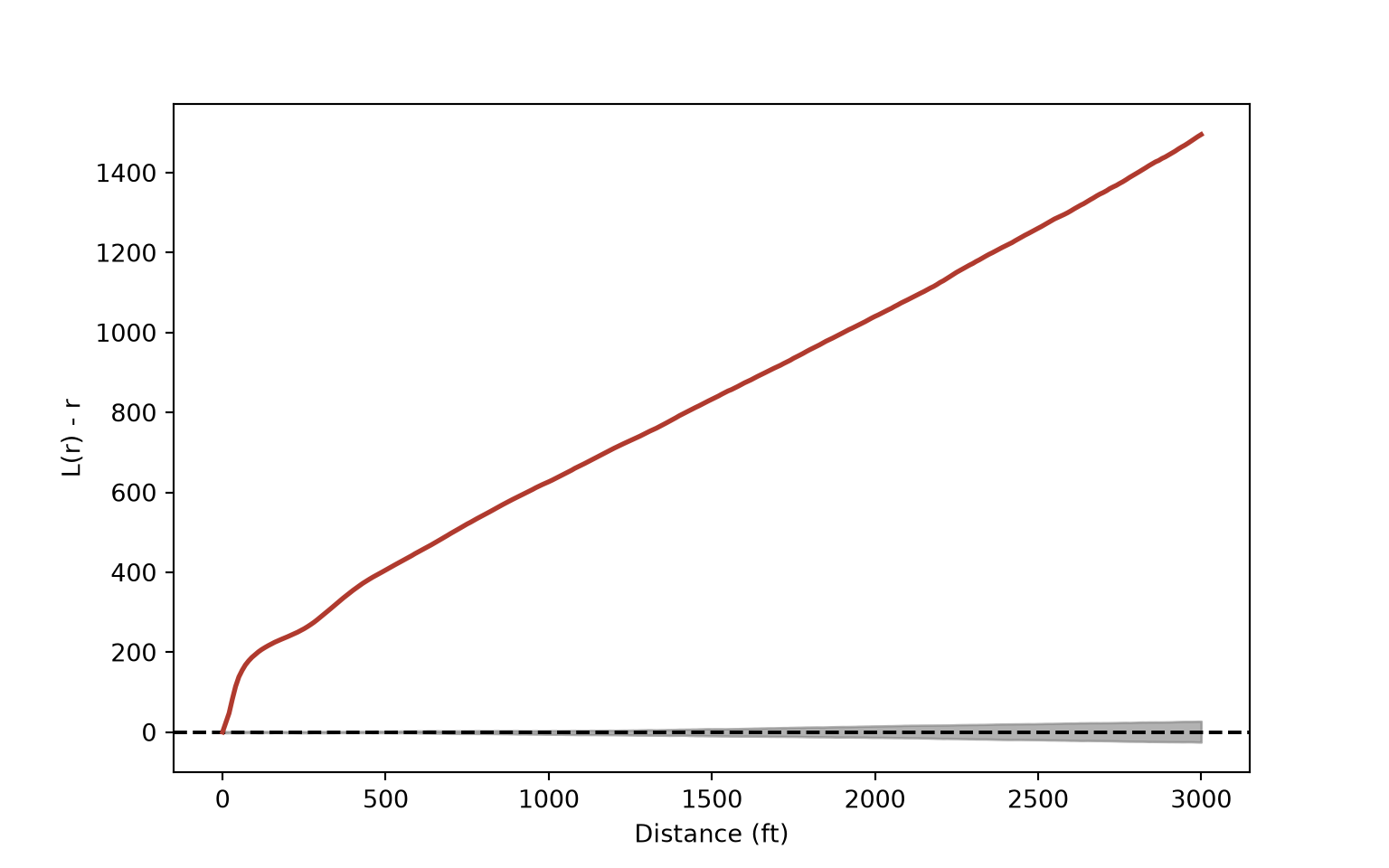
The observed \(L(r) - r\) curve (red line) is well above the simulation envelope (gray band) at all distances up to 3,000 feet, which indicates that the trees are significantly clustered across all of these scales. The curve increases rapidly at short distances, which reflects trees being closely spaced along streets, and continues to increase at larger distances, which reflects the concentration of street trees in specific neighborhoods and their absence from large parts of the city. Note that the envelope is so narrow relative to the observed values that it is barely visible: with more than 22,000 points, even a small departure from randomness would be significant.
Comparing to CSR assumes that, under the null hypothesis, points are equally likely to occur anywhere within the study area. This is not realistic for street trees, which can only occur along streets. As a result, some of the observed clustering simply reflects the street network as opposed to a tendency for trees to be planted near each other. Inhomogeneous versions of the K and L functions account for spatial variation in point density. Alternatively, the null model could be defined using random points located along the street network.
13.9 Global Hot Spot Analysis: Getis-Ord General G
13.9.1 The Statistic
The Getis-Ord General G statistic assesses whether high values or low values cluster in the study area. It is calculated as:
\[G = \frac{\sum_{i}\sum_{j} w_{ij} x_i x_j}{\sum_{i}\sum_{j} x_i x_j}, \quad j \neq i\]
In other words, \(G\) is the proportion of the total sum of products of all pairs of values that occurs between neighbors. If high values are located near other high values, the numerator will be large relative to its expected value, \(E[G]\), under the null hypothesis of no spatial clustering. If the observed \(G\) is significantly larger than \(E[G]\), high values cluster, which suggests hot spots. If it is significantly smaller, low values cluster, which suggests cold spots.
Unlike Moran’s I, General G distinguishes between clustering of high values and clustering of low values. However, the variable must contain only positive values, and binary weights are recommended. Similar to Moran’s I, it is a global statistic and does not indicate where clustering occurs. It is also possible for both hot spots and cold spots to be present and cancel each other out, resulting in a non-significant result.
13.9.2 Defining Neighbors for Polygons
For the county polygons, contiguity-based neighbors can be defined using Queen.from_dataframe() and Rook.from_dataframe(). Notice the warning that one county has no neighbors. This is San Juan County, Washington, which is made up of islands and therefore shares no boundary with any other county.
w_queen = Queen.from_dataframe(cnty)
w_rook = Rook.from_dataframe(cnty)

print(cnty.loc[w_queen.islands, ["COUNTY", "STATE"]])
COUNTY STATE
1501 San Juan WAprint(w_queen.n, w_queen.mean_neighbors)1502 5.908122503328895For distance-based neighbors, we need a single coordinate for each county. We use representative_point(), which, unlike centroid, guarantees that the point falls within the polygon. We then define neighbors using the 6 nearest counties. For the distance band, we set the threshold to the largest nearest neighbor distance, which is obtained using min_threshold_distance(), rounded up to the nearest kilometer. This guarantees that every county has at least one neighbor. The same distance band is used to define inverse distance weights, using distances in kilometers.
cnty_xy = cnty.representative_point().get_coordinates().to_numpy()

w_k6 = KNN.from_array(cnty_xy, k=6)

d_thresh = np.ceil(min_threshold_distance(cnty_xy) / 1000) * 1000
print(d_thresh)154000.0w_dist = DistanceBand.from_array(cnty_xy, threshold=d_thresh, binary=True)
w_invd = DistanceBand.from_array(cnty_xy / 1000, threshold=d_thresh / 1000, binary=False,
alpha=-1.0)
print(w_dist.mean_neighbors)27.05992010652463313.9.3 Calculating General G
The G class from esda calculates the General G statistic. It converts the weights to binary weights, as recommended. The G and EG properties store the observed and expected values, and z_norm and p_norm store the z-score and the one-sided p-value for the alternative hypothesis that high values cluster. We calculate General G for median income using queen contiguity, rook contiguity, 6 nearest neighbors, and the distance band.
cnty_w = {"Queen Contiguity": w_queen, "Rook Contiguity": w_rook,
          "6 Nearest Neighbors": w_k6, f"{d_thresh / 1000:.0f} km Distance Band": w_dist}

np.random.seed(42)
g_rows = []
for name, w in cnty_w.items():
    g = G(cnty["med_income"], w, permutations=999)
    g_rows.append({"conceptualization": name, "observed_g": g.G, "expected_g": g.EG,
                   "z_score": g.z_norm, "p_value": g.p_norm, "p_sim": g.p_sim})
print(pd.DataFrame(g_rows))
conceptualization observed_g expected_g z_score p_value p_sim
0 Queen Contiguity 0.004015 0.003936 7.079971 7.209788e-13 0.001
1 Rook Contiguity 0.003816 0.003737 7.334398 1.113554e-13 0.001
2 6 Nearest Neighbors 0.004128 0.003997 22.207779 0.000000e+00 0.001
3 154 km Distance Band 0.018119 0.018028 0.860168 1.948483e-01 0.196Since G always uses binary weights, it cannot be used with inverse distance weights. However, the statistic is simple to calculate from its definition. The sparse property of a weights object returns the weights as a sparse matrix, which stores only the nonzero values. The numerator, \(\sum_{i}\sum_{j} w_{ij} x_i x_j\), is then calculated using matrix multiplication (@). We assess significance using a permutation test, in which the income values are shuffled among the counties 999 times.
def general_g(x, w_sparse):
    """General G for any weights (the diagonal of the weights matrix is zero)."""
    return (x @ w_sparse @ x) / (x.sum() ** 2 - (x**2).sum())

x = cnty["med_income"].to_numpy()
w_invd.transform = "O"
g_obs = general_g(x, w_invd.sparse)
g_sim = np.array([general_g(rng.permutation(x), w_invd.sparse) for _ in range(999)])
print(g_obs, g_sim.mean(), (np.sum(g_sim >= g_obs) + 1) / 1000)
0.00020485004233296647 0.00020197366301376643 0.015Using queen contiguity, rook contiguity, 6 nearest neighbors, and inverse distance, the observed General G is greater than the expected value and statistically significant, which indicates that high median income values cluster. However, using the 154 km fixed distance band, the result is not statistically significant. A distance this large defines, on average, more than 25 neighbors for each county. At this broad scale, clusters of high- and low-income counties are averaged together. This demonstrates how the conceptualization of spatial relationships, and the scale that it implies, can change the conclusion. It also highlights a limitation of global statistics: they do not tell us where clusters occur. For this, we need a local statistic.
13.10 Local Hot Spot Analysis: Getis-Ord Gi*
13.10.1 The Statistic
The Getis-Ord Gi* statistic is a local statistic: a separate value is calculated for each feature. For each feature, the sum of the values within its neighborhood, including the feature itself, is compared to the sum that would be expected if values were randomly distributed. The result is reported as a z-score:
- A large positive z-score indicates that the feature and its neighbors have high values: a hot spot.
- A large negative z-score indicates that the feature and its neighbors have low values: a cold spot.
- A z-score near zero indicates no apparent clustering.
The asterisk indicates that the feature itself is included in its own neighborhood. The related Gi statistic excludes the feature itself. In esda, Gi* is calculated using the G_Local class with star=True. Note that a feature with a high value is not necessarily a hot spot; to be a hot spot, it must also be surrounded by other features with high values.
Results are commonly classified using the following z-score thresholds, which correspond to two-sided confidence levels:
- |z| ≥ 2.58: 99% confidence
- |z| ≥ 1.96: 95% confidence
- |z| ≥ 1.65: 90% confidence
13.10.2 Calculating Gi*
The Zs property of G_Local stores the z-score for each feature. We write a function that calculates Gi* for median income for a provided weights object using binary weights (transform="B"). We also write a function to classify the z-scores into hot and cold spot categories using the thresholds above with pd.cut().
hs_labels = ["Cold Spot - 99%", "Cold Spot - 95%", "Cold Spot - 90%",
             "Not Significant",
             "Hot Spot - 90%", "Hot Spot - 95%", "Hot Spot - 99%"]

def gi_star(w):
    return G_Local(cnty["med_income"], w, transform="B", star=True, permutations=0).Zs

def hs_class(z):
    return pd.cut(z, bins=[-np.inf, -2.58, -1.96, -1.65, 1.65, 1.96, 2.58, np.inf],
                  labels=hs_labels)
Gi* is then calculated using queen contiguity, 6 nearest neighbors, and the distance band. The results are added as new columns to the counties data, and the number of counties in each category is summarized using value_counts().
cnty["gi_queen"] = gi_star(w_queen)
cnty["gi_knn"] = gi_star(w_k6)
cnty["gi_dist"] = gi_star(w_dist)
for col in ["queen", "knn", "dist"]:
    cnty[f"hs_{col}"] = hs_class(cnty[f"gi_{col}"])

print(cnty["hs_queen"].value_counts(sort=False))
hs_queen
Cold Spot - 99% 107
Cold Spot - 95% 112
Cold Spot - 90% 81
Not Significant 942
Hot Spot - 90% 47
Hot Spot - 95% 69
Hot Spot - 99% 144
Name: count, dtype: int64print(cnty["hs_dist"].value_counts(sort=False))hs_dist
Cold Spot - 99% 266
Cold Spot - 95% 75
Cold Spot - 90% 59
Not Significant 731
Hot Spot - 90% 45
Hot Spot - 95% 92
Hot Spot - 99% 234
Name: count, dtype: int64Since a separate test is performed for each feature, and neighboring features share many of the same neighbors, some features will be identified as significant by chance alone. One option to account for this is to adjust the p-values using a false discovery rate (FDR) correction, for example using multipletests(method="fdr_bh") from Statsmodels. Alternatively, G_Local with permutations greater than 0 calculates p-values using a permutation test.
p_queen = 2 * stats.norm.sf(np.abs(cnty["gi_queen"]))
print((p_queen < 0.05).sum())432print((multipletests(p_queen, method="fdr_bh")[1] < 0.05).sum())238Using queen contiguity, the number of counties with a p-value less than 0.05 decreases substantially after applying the FDR correction. In the remainder of the chapter, we use the unadjusted z-score thresholds, but keep in mind that some of the counties identified at the 90% and 95% confidence levels may be false positives.
13.10.3 Comparing Conceptualizations
To compare the results, we generate a separate map for each conceptualization with a shared legend. Each hot spot category is assigned a color using a dictionary and the map() method. State boundaries are generated by dissolving the counties by state.
hs_colors = ["#2166ac", "#67a9cf", "#d1e5f0", "#f0f0f0", "#fddbc7", "#ef8a62", "#b2182b"]
color_map = dict(zip(hs_labels, hs_colors))
states = cnty.dissolve(by="STATE").reset_index()
hs_handles = [Patch(facecolor=c, edgecolor="grey", label=l) for l, c in color_map.items()]
titles = {"hs_queen": "Queen Contiguity", "hs_knn": "6 Nearest Neighbors",
"hs_dist": f"{d_thresh / 1000:.0f} km Distance Band"}
fig, axs = plt.subplots(1, 3, figsize=(14, 5))
for ax, (col, title) in zip(axs, titles.items()):
cnty.plot(ax=ax, color=cnty[col].astype(str).map(color_map), edgecolor="grey", linewidth=0.2)
states.boundary.plot(ax=ax, color="black", linewidth=0.8)
ax.set_title(title)
ax.set_axis_off()
fig.legend(handles=hs_handles, title="Gi* Result", loc="center right")
plt.subplots_adjust(right=0.85)
plt.show()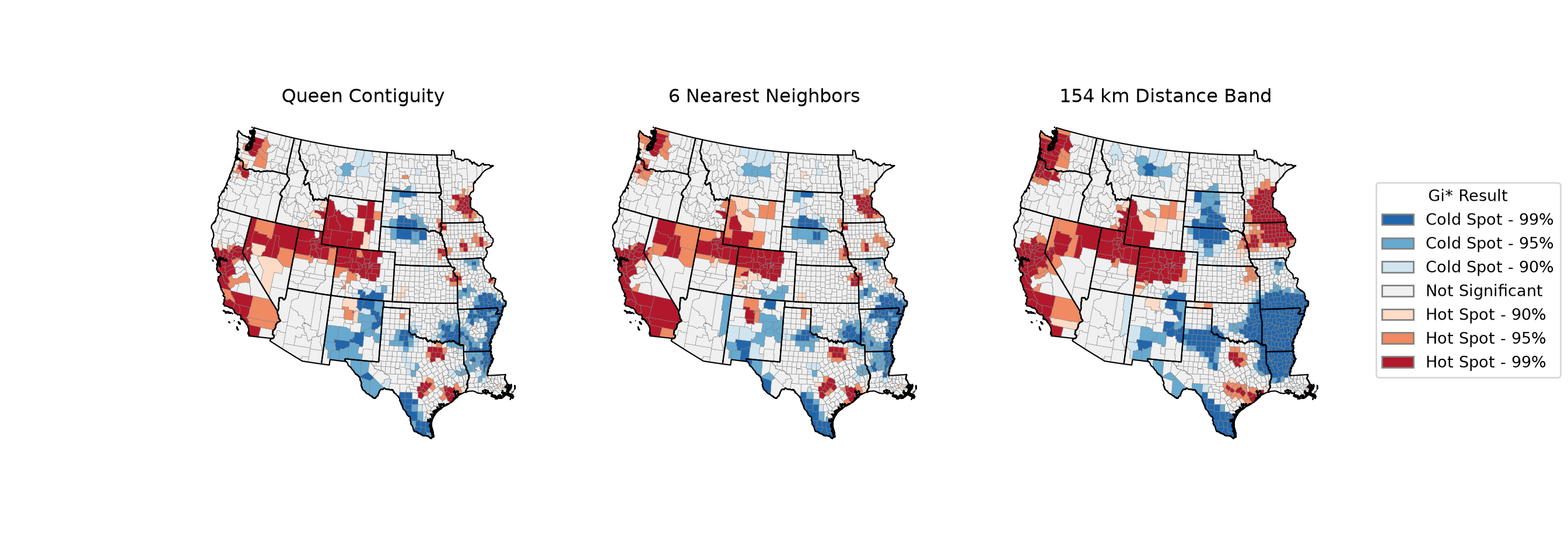
The general patterns are similar across the three maps. Hot spots of median income occur in areas such as the San Francisco Bay Area and southern California, the Seattle area, central Colorado, and the Minneapolis-St. Paul area, while cold spots occur in areas such as the Mississippi River valley in Arkansas and Louisiana, northern New Mexico, southern Texas, and parts of South Dakota. However, the size of these clusters changes. Queen contiguity and 6 nearest neighbors produce similar results since most counties have approximately six contiguous neighbors. The distance band includes many more neighbors per county, which results in larger and smoother clusters. In addition, with a fixed distance band, counties in areas with many small counties, such as the Great Plains, have many more neighbors than counties in areas with large counties, such as Nevada and Arizona.
13.10.4 Map Layout
Lastly, we generate a map layout of the Gi* results obtained using queen contiguity. We include county and state boundaries, state labels, a legend placed inside the map frame, a north arrow, a scale bar, a title, and a credit describing the method, as discussed in Chapter 8.
fig, ax = plt.subplots(figsize=(9, 9))
cnty.plot(ax=ax, color=cnty["hs_queen"].astype(str).map(color_map), edgecolor="grey",
          linewidth=0.2)
states.boundary.plot(ax=ax, color="black", linewidth=1)
for pnt, label in zip(states.representative_point(), states["STATE"]):
    ax.annotate(label, xy=(pnt.x, pnt.y), ha="center", va="center", fontsize=8)
ax.legend(handles=hs_handles, title="Gi* Hot Spot Analysis", loc="lower left",
          frameon=True, facecolor="white")
ax.annotate("N", xy=(0.95, 0.95), xytext=(0.95, 0.87), xycoords="axes fraction",
            ha="center", va="center", fontsize=12, fontweight="bold",
            arrowprops={"facecolor": "black", "width": 4, "headwidth": 12})
ax.add_artist(ScaleBar(1, units="m", fixed_value=500, fixed_units="km", location="lower right"))
ax.set_title("Median Household Income Hot Spots")
ax.text(0.99, 0.08, "Getis-Ord Gi* using queen contiguity", transform=ax.transAxes,
        ha="right", fontsize=8)
ax.set_axis_off()
plt.show()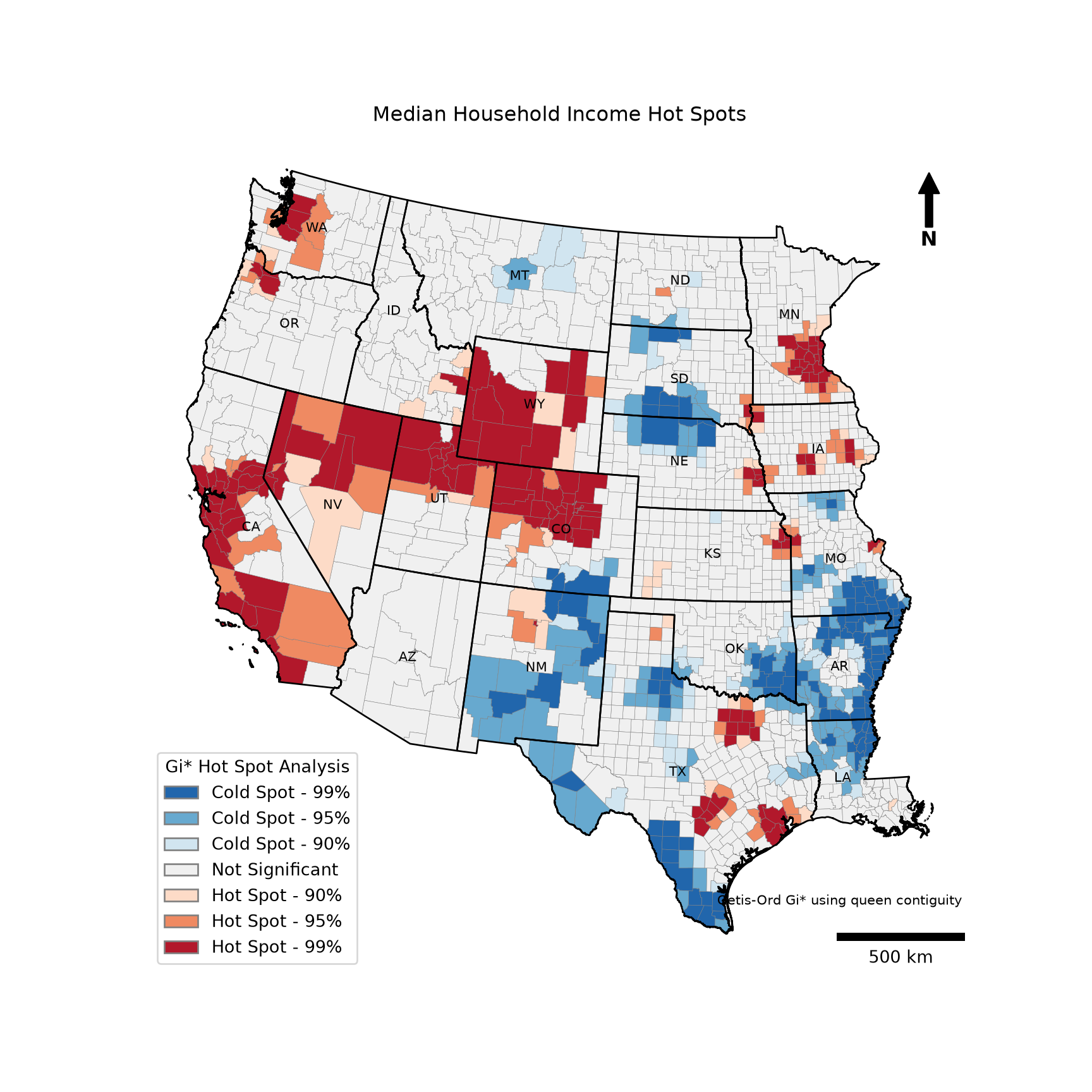
13.11 Concluding Remarks
In this chapter, we explored a set of commonly used spatial statistics. The average nearest neighbor statistic indicated that Pittsburgh street trees are strongly clustered, although the magnitude of the result depended on the defined study area. Moran’s I indicated that DBH values are positively spatially autocorrelated, with the strongest similarity between the nearest trees. The semivariogram characterized this dependence across distances. Ripley’s K and L functions indicated that the tree locations are clustered across all distances considered, from a few feet up to 3,000 feet. General G indicated that high median income values cluster across counties in the western United States, and Gi* identified where these hot spots, as well as cold spots, occur.
A common theme throughout the chapter is that the results of spatial statistics depend on choices made by the analyst, including the study area and the conceptualization of spatial relationships. These choices define the scale of the analysis. So, they should be made based on an understanding of the process being studied, explored using multiple options, and clearly reported. Also, keep in mind that these statistics describe spatial patterns but do not explain them. Spatial regression and machine learning methods that incorporate spatial information can be used to further investigate the factors driving these patterns.
13.12 Questions
- Explain how the average nearest neighbor ratio is calculated and how it is interpreted.
- Why is the average nearest neighbor statistic sensitive to the definition of the study area?
- Explain the difference between queen and rook contiguity.
- Explain the difference between binary and row standardized spatial weights.
- What is an island in a spatial weights object, and how does it impact the analysis?
- Explain the difference between positive and negative spatial autocorrelation.
- Define the nugget, sill, and range of a semivariogram.
- Explain the difference between an isotropic and an anisotropic semivariogram.
- Explain why Ripley’s K provides more information about a point pattern than the average nearest neighbor statistic.
- How are simulation envelopes used to assess the significance of Ripley’s K or L function?
- Explain one key difference between Moran’s I and Getis-Ord General G.
- Explain the difference between a global and a local spatial statistic.
- Explain the difference between the Getis-Ord Gi and Gi* statistics.
- Why might a feature with a high value not be identified as a hot spot by Gi*?
13.13 Exercises
Exercise 13.1: Spatial Statistics
Introduction
In this exercise, you will apply the spatial statistics demonstrated in Chapter 13 to new questions using the same datasets, which are stored in the spatial_stats.gpkg GeoPackage in the datasets/gisData/spatial_stats folder.
Deliverables
- Jupyter Notebook or Quarto document with all code, graphs, and maps embedded. Answers to questions should be provided in Markdown cells or text.
Questions and Tasks
Task 1
Using the trees layer, select all trees of the species Acer platanoides (Norway maple) with a DBH of at least 5 inches. Use the average nearest neighbor statistic to assess whether these trees are clustered, using the Pittsburgh city boundary, provided as the pittsburgh layer, as the study area. Then, assess whether their DBH values are spatially autocorrelated using Moran’s I with 8 nearest neighbors.
Task 2
Using the west_counties layer, perform a Getis-Ord General G test and a Getis-Ord Gi* hot spot analysis for the percent of the population living in poverty (“per_pov”). Compare the results obtained using rook contiguity and 8 nearest neighbors. Generate a map layout of the Gi* results. How do the hot spots and cold spots compare to those obtained for median income in this chapter?