import os
import numpy as np
import pandas as pd
import matplotlib.pyplot as plt
import geopandas as gpd
import rasterio
from rasterio.crs import CRS
from rasterio.enums import Resampling
from rasterio.warp import reproject, transform_bounds
from rasterio.windows import from_bounds
from rasterio.transform import from_origin
from rasterio.plot import plotting_extent
from shapely.geometry import box
import pystac_client
import planetary_computer11 Downloading Remotely Sensed Data
11.1 Topics Covered
- What is STAC?
- Downloading multispectral Sentinel-2 MSI or Landsat 9 OLI-2 data
- Filtering data based on cloud cover
- Creating a median composite using multiple cloud-free observations at a pixel location
- Downloading Sentinel-1 SAR data
- Downloading digital elevation data
- Visualizing downloaded data
11.2 Introduction
This chapter demonstrates how to search for and download analysis-ready data (ARD) for a small study area entirely from Python. Table 11.1 describes the data that we will explore. For multispectral data, we are interested in data that are already georeferenced and converted to surface reflectance. For synthetic aperture radar (SAR), we are interested in calibrated gamma-nought backscatter, terrain-flattened and orthorectified to a map grid. For the multispectral data sensors, we will find the image collected during a given time frame that has the lowest cloud cover over the study area extent, not just the scene with the lowest catalog cloud percentage. We will also explore building a seasonal median composite from every cloud-free Sentinel-2 observation over the time period of interest.
| Dataset | Product | Why it is “analysis ready” |
|---|---|---|
| Sentinel-2 MSI | Level-2A | Bottom-of-atmosphere surface reflectance (Sen2Cor), with a per-pixel scene classification used for cloud masking |
| Landsat 9 OLI-2 | Collection 2 Level-2 | Surface reflectance (LaSRC), with a QA bit-mask used for cloud masking |
| Sentinel-1 C-band SAR | Radiometric Terrain Corrected (RTC) | Calibrated gamma-nought backscatter, terrain-flattened and orthorectified to a map grid |
| USGS 3DEP DEM | 1/3 arc-second seamless | Bare-earth elevation (~10 m), US only |
11.3 What is STAC?
The SpatioTemporal Asset Catalog (STAC) specification is an open standard for describing geospatial data so it can be searched in a uniform way, regardless of who hosts it. Before STAC, each data provider (USGS EarthExplorer, Copernicus Hub, NASA Earthdata, etc.) had its own portal and API. Today, most large archives expose a STAC API, so the same few lines of code can search Landsat, Sentinel, digital terrain models (DTMs), and much more. This standardization greatly simplifies the experience for the end user.
A STAC catalog is built from four nested concepts:
-
Catalog: the top-level entry point, for example the Microsoft Planetary Computer API at
https://planetarycomputer.microsoft.com/api/stac/v1. -
Collection: a dataset with shared metadata, such as
sentinel-2-l2a,landsat-c2-l2, or3dep-seamless. -
Item: one spatiotemporal unit, typically a single scene or tile. It is a GeoJSON Feature with a footprint geometry, a datetime, and properties such as
eo:cloud_cover,platform, ors2:processing_baseline. -
Asset: a file belonging to an item, such as one spectral band, a QA layer, or a metadata file. Each asset has an
href(URL).
A STAC API adds a search endpoint, so you can ask for “all items in collection X, intersecting bounding box Y, between dates Z”, and optionally filter on item properties.
11.3.1 Cloud-Optimized GeoTIFFs
Most STAC assets are Cloud-Optimized GeoTIFFs (COGs). These are ordinary GeoTIFFs with internal tiling and overviews arranged so that a client can fetch only the bytes it needs using HTTP range requests. GDAL, and therefore Rasterio, reads them directly over the web. When combined with a window (Chapter 10), only the internal tiles that intersect the window are downloaded. As a result, for a small study area we never download whole 100 × 100 km scenes, only data that cover our area of interest.
11.3.2 Microsoft Planetary Computer
All data here come from the Microsoft Planetary Computer STAC API. It is free and needs no account. Its files are stored in Azure Blob Storage, and their URLs must be signed with a short-lived access token (about one hour) before use. The planetary-computer library handles this.
The same code works against other STAC APIs with small changes, for example Element 84 Earth Search on AWS (no signing; different collection and asset names), or Digital Earth Australia and the Copernicus Data Space Ecosystem.
11.4 Python Libraries Used
In this chapter, we use pystac-client to search for data stored using the STAC specification and planetary-computer to sign the asset URLs. We use Rasterio to read, resample, and write raster data, GeoPandas and pyproj to handle the study area extent and coordinate reference systems, and matplotlib for visualization. It should be noted that there are other options for searching and downloading remotely sensed data from Python. odc-stac and stackstac load STAC results directly into Xarray data cubes (Chapter 3) for large-area and/or time-series analysis.
11.5 Setup
11.5.1 Libraries and Settings
The study area is a small bounding box in longitude/latitude. 3DEP covers only the United States, so this example uses about 8 × 9 km of farmland, foothills, and town near Bozeman, Montana, USA. The date range is meteorological summer (June through August) 2024. That range defines both the period searched for the “clearest single date” and the season for the median composite. Downloaded data are stored in the output/stac folder.
aoi_bbox = (-111.10, 45.62, -111.00, 45.70)    # xmin, ymin, xmax, ymax (longitude/latitude)
date_range = "2024-06-01/2024-08-31"

# Scenes whose *scene-level* cloud cover exceeds this are skipped (saves time)
max_scene_cloud = 50
# Number of the least-cloudy Landsat dates to check for AOI-level cloud cover
n_candidates = 3

out_dir = "output/stac"
os.makedirs(out_dir, exist_ok=True)
11.5.2 GDAL Options for Remote Reading
Every remote read goes through GDAL (Geospatial Data Abstraction Library). GDAL reads its configuration options from environment variables, which can be set in Python using os.environ. These options cut down unnecessary HTTP requests:
-
GDAL_DISABLE_READDIR_ON_OPENstops GDAL from listing the “directory” for sidecar files. -
CPL_VSIL_CURL_ALLOWED_EXTENSIONSrestricts remote reading to GeoTIFFs.
The options also retry transient network errors. Note that Sentinel-1 RTC files end in .tiff rather than .tif, so both extensions must be allowed; otherwise, GDAL reports that the file does not exist.
os.environ.update({
    "GDAL_DISABLE_READDIR_ON_OPEN": "EMPTY_DIR",
    "CPL_VSIL_CURL_ALLOWED_EXTENSIONS": ".tif,.tiff",
    "GDAL_HTTP_MAX_RETRY": "5",
    "GDAL_HTTP_RETRY_DELAY": "2"})
11.5.3 Study Area and a Common Target Grid
The source datasets arrive in different projections and resolutions. Sentinel-2 and Landsat come in UTM, but the tile may be in a neighboring zone; 3DEP comes in geographic NAD83 coordinates. To make the outputs directly comparable, every layer is resampled onto one target grid in the UTM zone of the study area:
- a 10 m grid for Sentinel-2, Sentinel-1, and the DEM;
- a 30 m grid for Landsat.
The extent is snapped to multiples of 30 m so the two grids nest exactly: each 30 m cell holds exactly 3 × 3 cells of 10 m.
The UTM EPSG code is calculated from the longitude and latitude of the center of the study area: UTM zones are 6 degrees wide, and the WGS84 UTM zones are numbered EPSG:32601-32660 in the northern hemisphere and EPSG:32701-32760 in the southern hemisphere. A grid is defined by its transform and its shape (rows, columns), so we store each grid as a tuple of the two. Before resampling, each source image is cropped to the study area buffered by 200 m, so that resampling has valid neighbors at the edges.
lon_c = (aoi_bbox[0] + aoi_bbox[2]) / 2
lat_c = (aoi_bbox[1] + aoi_bbox[3]) / 2
utm_epsg = (32600 if lat_c >= 0 else 32700) + int((lon_c + 180) // 6) + 1
utm_crs = CRS.from_epsg(utm_epsg)

aoi_utm = gpd.GeoSeries([box(*aoi_bbox)], crs=4326).to_crs(utm_epsg)

# Snap the extent to multiples of 30 m so the 10 m and 30 m grids nest exactly
xmin, ymin, xmax, ymax = aoi_utm.total_bounds
xmin, ymin = np.floor(xmin / 30) * 30, np.floor(ymin / 30) * 30
xmax, ymax = np.ceil(xmax / 30) * 30, np.ceil(ymax / 30) * 30

def make_grid(res):
    """Return the (transform, shape) of a grid covering the snapped extent."""
    return (from_origin(xmin, ymax, res, res),
            (int(round((ymax - ymin) / res)), int(round((xmax - xmin) / res))))

grid10 = make_grid(10)
grid30 = make_grid(30)

# Slightly larger extent used to crop source images before resampling
crop_bounds = aoi_utm.buffer(200).total_bounds

print(utm_epsg)32612print(grid10)(Affine(10.0, 0.0, 492180.0,
0.0, -10.0, 5060730.0), (891, 783))11.5.4 Helper Functions
A handful of small functions keep the per-sensor sections short.
search_pc() runs a STAC search over the study area for one collection and date range. The catalog is opened using pystac_client.Client.open(). Providing planetary_computer.sign_inplace to the modifier parameter signs every asset URL with the Planetary Computer access token. Search results are returned in pages, and the items() method follows the “next” links until every item has been retrieved.
item_table() flattens the properties we need into a DataFrame: the item’s position in the list, its date, platform, and catalog cloud cover. This makes filtering and ranking easy with ordinary Pandas methods.
catalog = pystac_client.Client.open("https://planetarycomputer.microsoft.com/api/stac/v1",
                                    modifier=planetary_computer.sign_inplace)

def search_pc(collection, datetime=None):
    """Search one collection over the AOI and return all (signed) items."""
    search = catalog.search(collections=[collection], bbox=aoi_bbox, datetime=datetime,
                            limit=250)
    return list(search.items())

def item_table(items):
    """Tabulate the item properties we need for filtering and ranking."""
    return pd.DataFrame({
        "i": range(len(items)),
        "id": [it.id for it in items],
        "date": [pd.Timestamp(it.datetime).tz_localize(None).normalize() for it in items],
        "platform": [it.properties.get("platform") for it in items],
        "cloud": [it.properties.get("eo:cloud_cover", np.nan) for it in items]})
read_asset() reads a single remote COG, crops it in its native projection (cheap: only the needed tiles are fetched), and then reprojects and resamples it onto the target grid. The crop extent is converted to the coordinate reference system of the source file using transform_bounds(), and a window is defined from these bounds. Setting boundless=True allows the window to extend beyond the edge of the file; cells outside of the file are filled with NoData, which is converted to np.nan. The cropped array is then resampled onto the target grid using reproject().
A study area can straddle tile or frame boundaries, so one acquisition date may consist of several items. read_mosaic() reads the same asset from every item of a date and merges them: NaN cells in the first tile are filled with values from the next, and so on.
The optional fix argument applies a sensor-specific conversion (scaling, offset, no-data handling) to each tile before mosaicking. It receives the STAC item too, so it can use metadata such as the processing baseline.
def read_asset(href, grid, resampling=Resampling.bilinear):
    """Read one COG asset remotely: crop in its native CRS, then resample to grid."""
    dst_transform, dst_shape = grid
    with rasterio.open(href) as src:
        bounds = transform_bounds(utm_crs, src.crs, *crop_bounds)
        win = from_bounds(*bounds, transform=src.transform)
        win = win.round_offsets(op="floor").round_lengths(op="ceil")
        fill = src.nodata if src.nodata is not None else 0
        arr = src.read(1, window=win, boundless=True, fill_value=fill).astype("float32")
        if src.nodata is not None:
            arr[arr == src.nodata] = np.nan
        out = np.full(dst_shape, np.nan, dtype="float32")
        reproject(arr, out, src_transform=src.window_transform(win), src_crs=src.crs,
                  dst_transform=dst_transform, dst_crs=utm_crs,
                  src_nodata=np.nan, dst_nodata=np.nan, resampling=resampling)
    return out

def read_mosaic(items, asset, grid, resampling=Resampling.bilinear, fix=lambda r, it: r):
    """Read the same asset from several items of one date and mosaic them."""
    out = None
    for it in items:
        tile = fix(read_asset(it.assets[asset].href, grid, resampling), it)
        out = tile if out is None else np.where(np.isnan(out), tile, out)
    return out
Each optical reader below returns a dictionary containing the reflectance bands plus a clear layer: 1 = valid and cloud-free, 0 = cloud or shadow, NaN = no data. Two helpers work with that layer:
-
clear_fraction()gives the share of the study area that is clear. This is what we rank dates by. -
apply_clear_mask()sets cloudy pixels to NaN and drops theclearlayer.
def clear_fraction(scene):
    """Fraction of the AOI that is valid and cloud/shadow free (clear == 1)."""
    return np.mean(scene["clear"] == 1)

def apply_clear_mask(scene):
    """Apply the cloud mask stored in the clear layer to the reflectance bands."""
    keep = scene["clear"] == 1
    return {k: np.where(keep, v, np.nan) for k, v in scene.items() if k != "clear"}
We also write a function that saves a dictionary of layers that share a grid to a multiband GeoTIFF, with the dictionary keys used as band descriptions.
def write_grid(path, layers, grid):
    """Write a dictionary of 2D arrays on the same grid to a multiband GeoTIFF."""
    transform, shape = grid
    profile = {"driver": "GTiff", "dtype": "float32", "nodata": np.nan, "count": len(layers),
               "height": shape[0], "width": shape[1], "crs": utm_crs, "transform": transform,
               "compress": "deflate"}
    with rasterio.open(path, "w", **profile) as dst:
        for i, (name, arr) in enumerate(layers.items(), start=1):
            dst.write(arr.astype("float32"), i)
            dst.set_band_description(i, name)
11.6 Sentinel-2 L2A Surface Reflectance
11.6.1 Converting Digital Numbers to Reflectance
Sentinel-2 L2A bands are stored as 16-bit integers. Two details matter for converting them to true surface reflectance:
- Scale: reflectance = DN / 10,000.
- Offset: from processing baseline 04.00 (products from 25 January 2022 onwards), ESA added a constant of +1,000 to every DN so that very dark surfaces are not clipped at zero. That offset must be subtracted first: reflectance = (DN − 1,000) / 10,000.
s2_fix() reads the s2:processing_baseline property of each STAC item, so the correct formula is applied even if a time series spans the 2022 change. A DN of 0 means no data.
11.6.2 Cloud Masking with the Scene Classification Layer
The L2A product includes a 20 m Scene Classification Layer (SCL). We keep pixels classed as dark area, vegetation, bare soil, water, unclassified, or snow. We mask no data, saturated pixels, cloud shadow, medium- and high-probability cloud, and thin cirrus. The SCL is resampled with nearest neighbor because it is categorical; reflectance bands use bilinear resampling. The 20 m SWIR bands (B11, B12) are resampled to the 10 m grid. The np.isin() function tests whether each SCL value is one of the clear classes.
s2_bands = {"blue": "B02", "green": "B03", "red": "B04", "nir": "B08", "swir1": "B11", "swir2": "B12"}
# SCL classes treated as clear: 2 dark area/shadow, 4 vegetation, 5 bare soil,
# 6 water, 7 unclassified, 11 snow. Masked: 0 no data, 1 saturated, 3 cloud
# shadow, 8/9 cloud medium/high probability, 10 thin cirrus.
scl_clear = [2, 4, 5, 6, 7, 11]

def s2_fix(r, item):
    """DN -> surface reflectance."""
    r = np.where(r == 0, np.nan, r)                                    # 0 = no data
    baseline = float(item.properties.get("s2:processing_baseline", 0))
    offset = -1000 if baseline >= 4 else 0
    return (r + offset) / 10000

def read_s2_date(items):
    scene = {name: read_mosaic(items, band, grid10, Resampling.bilinear, s2_fix)
             for name, band in s2_bands.items()}
    scl = read_mosaic(items, "SCL", grid10, Resampling.nearest)      # 20 m class layer
    clear = np.isin(scl, scl_clear).astype("float32")
    clear[np.isnan(scl) | np.isnan(scene["blue"])] = np.nan
    scene["clear"] = clear
    return scene
11.6.3 Searching and Reading Every Candidate Date
We search the whole season, drop scenes with more than max_scene_cloud percent catalog cloud (they are very unlikely to be useful), and group the remaining items by acquisition date, since one date may need several Military Grid Reference System (MGRS) tiles. Every candidate date is then read. These scenes are needed for the median composite anyway, so the same data also let us measure cloud cover inside the study area for every date and associated pixel.
This is the slowest step: roughly 20–30 dates × 7 assets, each a small remote read. Expect a few minutes.
s2_items = search_pc("sentinel-2-l2a", date_range)
s2_tab = item_table(s2_items)
s2_tab = s2_tab[s2_tab["cloud"] <= max_scene_cloud]

# One entry per acquisition date (a date can need several MGRS tiles)
s2_dates = sorted(s2_tab["date"].unique())
print(f"{len(s2_dates)} Sentinel-2 dates with scene cloud <= {max_scene_cloud}%")
24 Sentinel-2 dates with scene cloud <= 50%
s2_scenes = {}
for d in s2_dates:
    items = [s2_items[i] for i in s2_tab.loc[s2_tab["date"] == d, "i"]]
    s2_scenes[d] = read_s2_date(items)
11.6.4 Choosing the Clearest Date
The catalog’s eo:cloud_cover describes the whole 110 × 110 km tile, so it can be misleading for a small study area. A tile can report 1% cloud while that 1% sits right on top of your site, or report 35% while your site is perfectly clear. The table below compares the two measures; in practice the rankings can differ noticeably. A date can also have a low study-area clear fraction even when its scene cloud cover is low: the study area sits near the edge of two Sentinel-2 orbits, and the swath of one of them only covers a small corner of it, so most of the study area has no data on those dates. We pick the date with the highest study-area clear fraction and break ties by scene cloud cover.
s2_summary = pd.DataFrame({
    "date": s2_dates,
    "scene_cloud": [s2_tab.loc[s2_tab["date"] == d, "cloud"].mean() for d in s2_dates],
    "aoi_clear": [clear_fraction(s2_scenes[d]) for d in s2_dates]})
s2_summary = s2_summary.sort_values(["aoi_clear", "scene_cloud"], ascending=[False, True])
print(s2_summary.round(3).to_string(index=False))
date scene_cloud aoi_clear
2024-08-27 0.001 1.000
2024-08-17 0.014 1.000
2024-08-22 0.018 1.000
2024-06-08 1.293 1.000
2024-08-02 1.484 1.000
2024-07-13 3.076 1.000
2024-07-23 3.897 1.000
2024-06-13 0.001 1.000
2024-08-12 35.969 1.000
2024-06-23 1.658 1.000
2024-07-18 40.066 0.910
2024-06-10 34.785 0.081
2024-06-20 6.739 0.038
2024-06-25 9.304 0.011
2024-06-05 0.746 0.009
2024-07-10 4.252 0.005
2024-07-05 4.874 0.005
2024-07-15 20.839 0.002
2024-08-14 35.947 0.002
2024-07-25 23.579 0.001
2024-06-30 40.056 0.000
2024-08-24 15.987 0.000
2024-08-09 31.975 0.000
2024-06-15 32.120 0.000best_s2_date = s2_summary["date"].iloc[0]
s2_best = s2_scenes[best_s2_date]
write_grid(f"{out_dir}/s2_l2a_{best_s2_date:%Y-%m-%d}.tif", s2_best, grid10)
print(f"Clearest Sentinel-2 date: {best_s2_date:%Y-%m-%d}")Clearest Sentinel-2 date: 2024-08-2711.6.5 Seasonal Median Composite of Cloud-Free Observations
A single “clearest” scene is a snapshot. A median composite summarizes the whole season and fills gaps where clouds affect individual dates. For each band:
- Mask every date with its own
clearlayer, so cloud and shadow become NaN. - Stack all dates and take the per-pixel median, ignoring NaNs.
The median is preferred over the mean because it is robust to residual undetected cloud edges, haze, and shadows, which tend to be outliers. A count layer, n_clear, records how many clear observations went into each pixel. It is a useful quality indicator: pixels with only one or two looks are less representative of the season.
Because every scene is already on the same 10 m grid, the per-pixel operations are simple array stacking using np.stack() and np.nanmedian(). No further alignment is needed.
Downloading multiple images and creating a median composite can be difficult for larger extents due to the volume of data needed. This can be done in the cloud using Google Earth Engine (GEE), which can be accessed from Python using the earthengine-api and geemap libraries. We do not demonstrate that method here since it requires you to obtain credentials to use GEE. However, it is a great option if you need to generate composite images for larger spatial extents.
s2_masked = [apply_clear_mask(s) for s in s2_scenes.values()]

s2_median = {b: np.nanmedian(np.stack([s[b] for s in s2_masked]), axis=0) for b in s2_bands}
s2_median["n_clear"] = np.sum([~np.isnan(s["red"]) for s in s2_masked], axis=0).astype("float32")

write_grid(f"{out_dir}/s2_l2a_median_JJA2024.tif", s2_median, grid10)
print(f"Composite built from {len(s2_masked)} dates; clear observations per pixel range from "
      f"{s2_median['n_clear'].min():.0f} to {s2_median['n_clear'].max():.0f}")
Composite built from 24 dates; clear observations per pixel range from 9 to 2111.7 Landsat 9 OLI-2 Collection 2 Level-2 Surface Reflectance
11.7.1 Scaling and QA Masking
The Planetary Computer landsat-c2-l2 collection holds Landsat 4-9. We keep only items whose platform is landsat-9. Collection 2 Level-2 surface reflectance bands use the USGS scale and offset:
\[\rho = DN \times 0.0000275 - 0.2\]
Cloud masking uses the qa_pixel band. This is a bit-packed integer where each bit is a flag. A pixel is flagged when any of the bits listed in Table 11.2 is set.
| Bit | Meaning |
|---|---|
| 0 | Fill (no data) |
| 1 | Dilated cloud |
| 2 | Cirrus |
| 3 | Cloud |
| 4 | Cloud shadow |
The mask is built using the bitwise AND operator (&) against the sum of those bit values (2⁰ + 2¹ + 2² + 2³ + 2⁴ = 31): if the result is 0, none of the flags are set. Landsat is kept on its native 30 m grid and resampled with nearest neighbor, which preserves the original pixel values.
l9_bands = {"blue": "blue", "green": "green", "red": "red", "nir": "nir08",
            "swir1": "swir16", "swir2": "swir22"}

def l9_fix(r, item):
    r = np.where(r == 0, np.nan, r)
    return r * 0.0000275 - 0.2

def read_l9_date(items):
    scene = {name: read_mosaic(items, band, grid30, Resampling.nearest, l9_fix)
             for name, band in l9_bands.items()}
    qa = read_mosaic(items, "qa_pixel", grid30, Resampling.nearest)
    bad = 2**0 + 2**1 + 2**2 + 2**3 + 2**4        # fill, dilated cloud, cirrus, cloud, shadow
    clear = ((np.nan_to_num(qa).astype("uint16") & bad) == 0).astype("float32")
    clear[np.isnan(qa) | np.isnan(scene["blue"])] = np.nan
    scene["clear"] = clear
    return scene
11.7.2 Choosing the Clearest Date
For a single best Landsat scene, there is no need to read every date. The search ranks dates by catalog cloud cover, then reads only the top n_candidates and measures the clear fraction inside the study area. This is the same principle as for Sentinel-2, but cheaper.
l9_items = search_pc("landsat-c2-l2", date_range)
l9_tab = item_table(l9_items)
l9_tab = l9_tab[l9_tab["platform"] == "landsat-9"]

# Rank dates by scene cloud cover, then check the AOI itself for the best few
l9_rank = (l9_tab.groupby("date", as_index=False)["cloud"].mean()
           .sort_values("cloud").head(n_candidates).reset_index(drop=True))

l9_cands = [read_l9_date([l9_items[i] for i in l9_tab.loc[l9_tab["date"] == d, "i"]])
            for d in l9_rank["date"]]
l9_rank["aoi_clear"] = [clear_fraction(s) for s in l9_cands]
print(l9_rank.round(4).to_string(index=False))
date cloud aoi_clear
2024-08-18 0.35 0.9998
2024-08-02 0.83 0.9999
2024-06-06 1.21 0.9999best_l9 = l9_rank.sort_values(["aoi_clear", "cloud"], ascending=[False, True]).index[0]
best_l9_date = l9_rank.loc[best_l9, "date"]
l9_best = l9_cands[best_l9]
write_grid(f"{out_dir}/l9_c2l2_{best_l9_date:%Y-%m-%d}.tif", l9_best, grid30)
print(f"Clearest Landsat 9 date: {best_l9_date:%Y-%m-%d}")Clearest Landsat 9 date: 2024-08-0211.8 Sentinel-1 RTC Backscatter
11.8.1 Why RTC?
Raw Sentinel-1 Ground Range Detected (GRD) data are in radar geometry, and their brightness depends strongly on terrain. Slopes facing the sensor appear bright and slopes facing away appear dark, regardless of land cover. The Planetary Computer sentinel-1-rtc collection has been processed to fix this:
- radiometrically calibrated and terrain-flattened to gamma-nought (γ⁰) backscatter, which removes most of the slope-dependent brightness;
- orthorectified onto a UTM map grid at 10 m using the Copernicus DEM.
That makes it the SAR equivalent of surface reflectance: georeferenced, comparable between dates and orbits, and ready to analyze.
Values are stored as linear power. s1_fix() converts them to decibels with \(\sigma_{dB} = 10 \log_{10}(\gamma^0)\), which is the scale usually used for display and statistics. Zero or negative values are no data.
11.8.2 Choosing a Date
Clouds do not affect C-band SAR, so there is no cloud ranking. Instead, we pick the Sentinel-1 acquisition closest in time to the clearest Sentinel-2 date, so the optical and radar layers describe nearly the same surface conditions. All frames from that date are mosaicked.
def s1_fix(r, item):
    r = np.where(r <= 0, np.nan, r)       # no-data / invalid
    return 10 * np.log10(r)               # linear gamma0 -> dB

s1_items = search_pc("sentinel-1-rtc", date_range)
s1_tab = item_table(s1_items)
s1_dates = pd.Series(s1_tab["date"].unique())
s1_date = s1_dates.iloc[(s1_dates - best_s2_date).abs().argmin()]
s1_feats = [s1_items[i] for i in s1_tab.loc[s1_tab["date"] == s1_date, "i"]]

s1 = {"VV_dB": read_mosaic(s1_feats, "vv", grid10, Resampling.bilinear, s1_fix),
      "VH_dB": read_mosaic(s1_feats, "vh", grid10, Resampling.bilinear, s1_fix)}
write_grid(f"{out_dir}/s1_rtc_{s1_date:%Y-%m-%d}.tif", s1, grid10)

props = s1_feats[0].properties
print(f"Sentinel-1 date: {s1_date:%Y-%m-%d} ({props.get('sat:orbit_state')} pass, "
      f"relative orbit {props.get('sat:relative_orbit')})")
Sentinel-1 date: 2024-08-20 (descending pass, relative orbit 100)Bilinear resampling is applied to the dB values here for simplicity. For quantitative work, many analysts prefer to resample or average SAR data in linear units and convert to dB afterwards, and to apply a speckle filter. RTC products are also not speckle filtered.
11.9 USGS 3DEP DTM
The 3dep-seamless collection holds both 1/3 arc-second (gsd = 10) and 1 arc-second (gsd = 30) tiles in geographic NAD83 coordinates. We keep the ~10 m tiles, mosaic them, and resample bilinearly to the 10 m UTM grid. Elevation values are already in meters, so no scaling is needed. The DEM has no date, so the search has no datetime.
For even finer terrain, the 3dep-lidar-dtm collection provides lidar-derived 1 m DTMs where lidar coverage exists.
dem_items = [it for it in search_pc("3dep-seamless") if it.properties.get("gsd") == 10]
dem = read_mosaic(dem_items, "data", grid10, Resampling.bilinear)
write_grid(f"{out_dir}/dem_3dep_10m.tif", {"elevation_m": dem}, grid10)
print(np.nanmin(dem), np.nanmax(dem))
1437.9298 1654.949311.10 Visualizing the Results
11.10.1 Optical Imagery
We display three layers as red, green, and blue using the plot_rgb() approach introduced in Chapter 10. Reflectance is a 0-1 float, so we apply a linear percentile stretch for good contrast.
- True color (red, green, blue) looks the way our eyes would see it.
- The [NIR, red, green] false color shows healthy vegetation in bright red.
- The [SWIR1, NIR, red] combination separates vegetation (green), bare soil (pink), and built-up surfaces (blue/purple) well.
The last panel maps n_clear, the number of cloud-free looks behind each composite pixel. Its stepped pattern follows Sentinel-2 orbit and tile overlaps: pixels covered by two orbits get more looks.
def stretch(band, low=2, high=98):
    """Linear percent stretch of a band to 0-1, ignoring NaN cells."""
    p_low, p_high = np.nanpercentile(band, [low, high])
    return np.clip((band - p_low) / (p_high - p_low), 0, 1)

def rgb(scene, r, g, b):
    return np.nan_to_num(np.dstack([stretch(scene[k]) for k in (r, g, b)]))

ext10 = plotting_extent(s2_best["red"], grid10[0])
ext30 = plotting_extent(l9_best["red"], grid30[0])

panels = [(rgb(s2_best, "red", "green", "blue"), ext10, f"Sentinel-2 true color {best_s2_date:%Y-%m-%d}"),
          (rgb(s2_best, "nir", "red", "green"), ext10, "Sentinel-2 false color (NIR-R-G)"),
          (rgb(l9_best, "red", "green", "blue"), ext30, f"Landsat 9 true color {best_l9_date:%Y-%m-%d}"),
          (rgb(s2_median, "red", "green", "blue"), ext10, "S2 median composite JJA 2024"),
          (rgb(s2_median, "swir1", "nir", "red"), ext10, "S2 median composite (SWIR1-NIR-R)")]

fig, axs = plt.subplots(2, 3, figsize=(12, 8.5))
for ax, (img, ext, title) in zip(axs.flat, panels):
    ax.imshow(img, extent=ext)
    ax.set_title(title, fontsize=10)
    ax.set_axis_off()
im = axs.flat[5].imshow(s2_median["n_clear"], extent=ext10, cmap="viridis")
fig.colorbar(im, ax=axs.flat[5], shrink=0.8)
axs.flat[5].set_title("Clear observations per pixel", fontsize=10)
axs.flat[5].set_axis_off()
plt.tight_layout()
plt.show()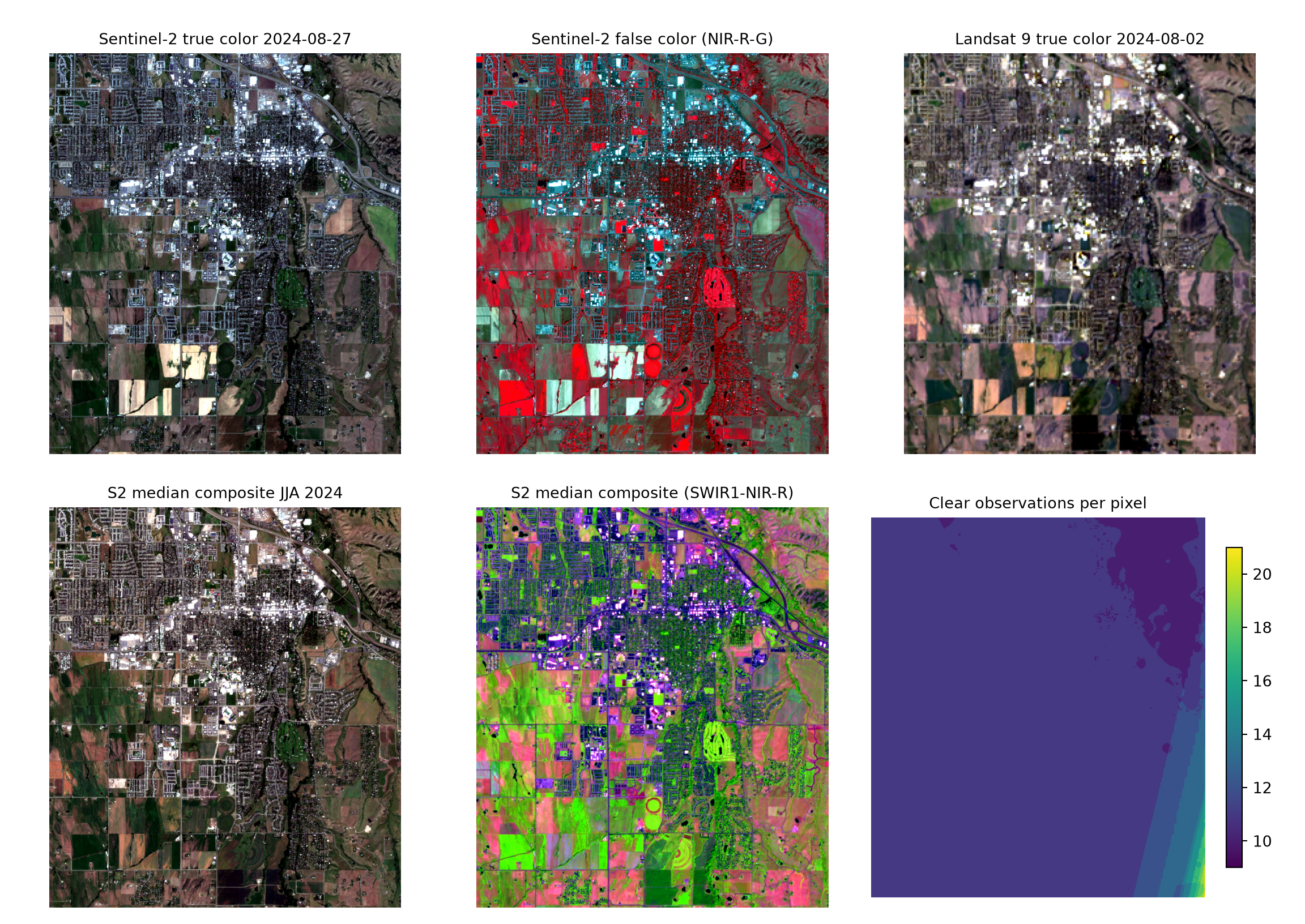
11.10.2 Thematic Maps
The thematic maps below are generated using the methods discussed in Chapter 8 and Chapter 10.
-
DTM: a hillshade is drawn in grey, then the elevation layer is drawn semi-transparently (
alpha) on top to give a shaded-relief map. The study area boundary is drawn in black. -
SAR: a reversed grey colormap shows low backscatter dark (smooth surfaces, calm water, bare fields) and high backscatter bright. Buildings stand out through double-bounce scattering, and VV is generally brighter than VH. The
vminandvmaxparameters ofimshow()define the display limits; values outside of them are shown using the end colors. - NDVI: computed from the median composite, \(\text{NDVI} = (\rho_{NIR} - \rho_{red}) / (\rho_{NIR} + \rho_{red})\).
def hillshade(z, res, altitude=40, azimuth=315):
    """Hillshade (0-1) using NumPy gradients; rows increase to the south."""
    dzdy, dzdx = np.gradient(z, res)
    slope = np.arctan(np.hypot(dzdx, dzdy))
    aspect = np.arctan2(-dzdx, dzdy) % (2 * np.pi)
    zen, az = np.radians(90 - altitude), np.radians(azimuth)
    return np.clip(np.cos(zen) * np.cos(slope) + np.sin(zen) * np.sin(slope) * np.cos(az - aspect), 0, 1)

hill = hillshade(dem, 10)
ndvi = (s2_median["nir"] - s2_median["red"]) / (s2_median["nir"] + s2_median["red"])

fig, axs = plt.subplots(2, 2, figsize=(12, 11))
axs[0, 0].imshow(hill, extent=ext10, cmap="Greys_r")
im = axs[0, 0].imshow(dem, extent=ext10, cmap="terrain", alpha=0.55)
aoi_utm.boundary.plot(ax=axs[0, 0], color="black")
fig.colorbar(im, ax=axs[0, 0], shrink=0.7, label="Elevation (m)")
axs[0, 0].set_title('USGS 3DEP 1/3" DEM')

for ax, (key, lims, title) in zip([axs[0, 1], axs[1, 0]],
                                  [("VV_dB", (-20, 0), f"Sentinel-1 RTC gamma0 VV {s1_date:%Y-%m-%d}"),
                                   ("VH_dB", (-28, -8), "Sentinel-1 VH")]):
    im = ax.imshow(s1[key], extent=ext10, cmap="Greys_r", vmin=lims[0], vmax=lims[1])
    fig.colorbar(im, ax=ax, shrink=0.7, label=f"{key[:2]} (dB)")
    ax.set_title(title)

im = axs[1, 1].imshow(ndvi, extent=ext10, cmap="RdYlGn", vmin=0, vmax=0.9)
fig.colorbar(im, ax=axs[1, 1], shrink=0.7, label="NDVI")
axs[1, 1].set_title("NDVI, S2 median JJA 2024")

for ax in axs.flat:
    ax.set_axis_off()
plt.tight_layout()
plt.show()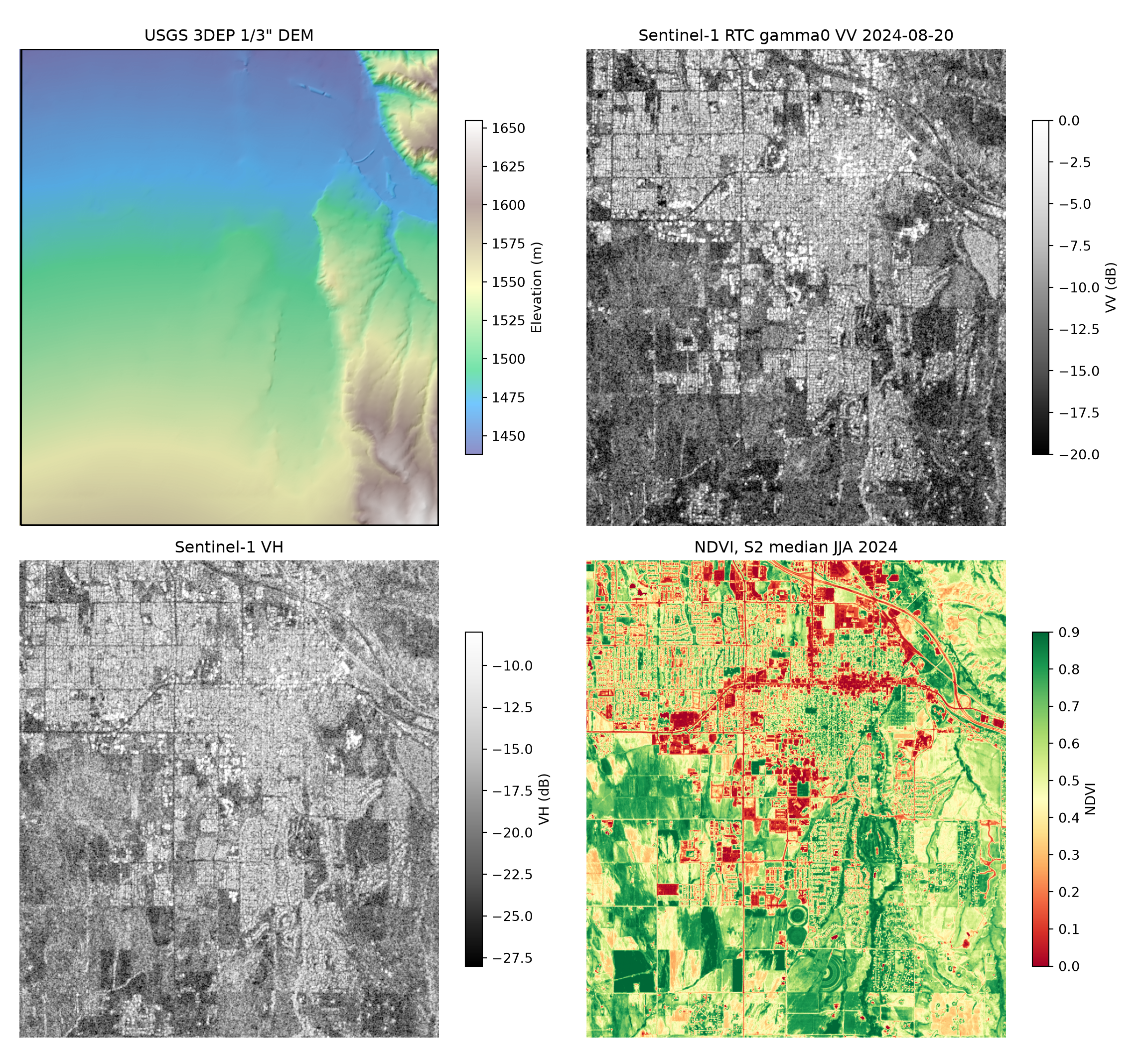
11.11 Outputs
All raster grids are written as GeoTIFFs in the output/stac folder and share the same UTM grid (10 m, or 30 m for Landsat), so they can be stacked directly for further analysis.
files = sorted(f for f in os.listdir(out_dir) if f.endswith(".tif"))
print(pd.DataFrame({"file": files,
                    "size_MB": [round(os.path.getsize(f"{out_dir}/{f}") / 1e6, 1) for f in files]}))
file size_MB
0 dem_3dep_10m.tif 1.9
1 l9_c2l2_2024-07-08.tif 1.7
2 l9_c2l2_2024-08-02.tif 1.7
3 s1_rtc_2024-07-15.tif 4.9
4 s1_rtc_2024-08-20.tif 4.9
5 s2_l2a_2024-07-13.tif 12.8
6 s2_l2a_2024-08-27.tif 12.8
7 s2_l2a_median_JJA2024.tif 13.1Signed URLs last about an hour. If a long session fails with HTTP 403 errors, re-run the search code to obtain fresh signatures.
11.12 Concluding Remarks
We hope you found the workflow presented in this chapter useful. It is powerful to be able to find, download, preprocess, and analyze geospatial data all in the same environment. To apply it to a different study area or time period, change aoi_bbox (keeping the area modest, i.e., tens of square kilometers) and date_range. If your search does not return a near cloud-free scene, you can make scl_clear less strict; to exclude snow, remove class 11 from scl_clear.
11.13 Questions
- Explain the differences between a catalog, a collection, an item, and an asset in the STAC specification.
- Why do Cloud-Optimized GeoTIFFs (COGs) make it possible to read only the portion of an image that covers a study area?
- What spectral bands are provided by Sentinel-2 MSI?
- What are the spatial resolutions of the bands provided by Sentinel-2 MSI?
- What spectral bands are provided by Landsat 9 OLI-2?
- USGS 3DEP data are only available within the United States. What is another elevation data source that can be obtained for areas outside of the United States from the Microsoft Planetary Computer?
- What is the collection mode of the Sentinel-1 RTC data that were downloaded in this chapter?
- What transmitting and receiving polarizations are available for the Sentinel-1 RTC data that were downloaded in this chapter?
- List another optical data source that can be searched for using pystac-client.
- Why was it not necessary to filter the Sentinel-1 SAR data in our example for cloud cover?
- Why can the scene-level cloud cover reported in the catalog be misleading for a small study area?
- Why is a per-pixel median generally preferred over the mean when creating a seasonal composite?