| Dataset | Product | Why it is "analysis ready" |
|---|---|---|
| Sentinel-2 MSI | Level-2A | Bottom-of-atmosphere surface reflectance (Sen2Cor), with a per-pixel scene classification used for cloud masking |
| Landsat 9 OLI | Collection 2 Level-2 | Surface reflectance (LaSRC), with a QA bit-mask used for cloud masking |
| Sentinel-1 C-band SAR | Radiometric Terrain Corrected (RTC) | Calibrated gamma-nought backscatter, terrain-flattened and orthorectified to a map grid |
| USGS 3DEP DEM | 1/3 arc-second seamless | Bare-earth elevation (~10 m), US only |
13 Downloading Remotely Sensed Data
13.1 Topics Covered
- What is STAC?
- Downloading multispectral Sentinel-2 MSI or Landsat 9 OLI-2 data
- Filter data based on cloud cover
- Create a median composite using multiple cloud-free observations at a pixel location
- Download Sentinel-1 SAR data
- Download digital elevation data
- Visualize downloaded data
13.2 Introduction
This chapter demonstrates how to search for and download analysis-ready data (ARD) for a small study area entirely from R. Table 13.1 explains the data that we will explore. For multispectral data, we are interested in data that are already georeferenced and converted to surface reflectance. For synthetic aperture radar (SAR), we are interested in calibrated gamma-nought backscatter, terrain-flattened and orthorectified to a map grid. For the multispectral data sensors, we will find the image collected during a given time frame that has the lowest cloud cover over the study area extent, not just the scene with the lowest catalog cloud percentage. We will also explore building a seasonal median composite from every cloud-free Sentinel-2 observation over the time period of interest.
13.3 What is STAC?
The SpatioTemporal Asset Catalog (STAC) specification is an open standard for describing geospatial data so it can be searched in a uniform way, regardless of who hosts it. Before STAC, each data provider (USGS EarthExplorer, Copernicus Hub, NASA Earthdata, etc.) had its own portal and API. Today most large archives expose a STAC API, so the same few lines of code can search Landsat, Sentinel, DEMs, and much more. This standardization greatly simplifies the experience for for the end user.
A STAC catalog is built from four nested concepts:
-
Catalog: the top-level entry point, for example the Microsoft Planetary Computer API at
https://planetarycomputer.microsoft.com/api/stac/v1. -
Collection: a dataset with shared metadata, such as
sentinel-2-l2a,landsat-c2-l2or3dep-seamless. -
Item: one spatiotemporal unit, typically a single scene or tile. It is a GeoJSON Feature with a footprint geometry, a datetime, and properties such as
eo:cloud_cover,platformors2:processing_baseline. -
Asset: a file belonging to an item, such as one spectral band, a QA layer, or a metadata file. Each asset has an
href(URL).
A STAC API adds a /search endpoint, so you can ask for “all items in collection X, intersecting bounding box Y, between dates Z”, and optionally filter on item properties.
13.3.1 Cloud-Optimized GeoTIFFs
Most STAC assets are Cloud-Optimized GeoTIFFs (COGs). These are ordinary GeoTIFFs with internal tiling and overviews arranged so that a client can fetch only the bytes it needs using HTTP range requests. GDAL (and therefore terra) reads them directly over the web through its /vsicurl/ virtual file system. As a result, for a small study area we never download whole 100 × 100 km scenes, only data that cover our area of interest.
13.3.2 Microsoft Planetary Computer
All data here come from the Microsoft Planetary Computer STAC API. It is free and needs no account. Its files live in Azure Blob Storage, and their URLs must be signed with a short-lived access token (about one hour) before use. rstac handles this with items_sign(sign_planetary_computer()).
The same code works against other STAC APIs with small changes, for example Element 84 Earth Search on AWS (no signing; different collection and asset names), or Digital Earth Australia and the Copernicus Data Space Ecosystem.
13.4 R packages Used
In this chapter, we use the R packages listed in the following table. rstac is the primary tool for searching for data stored using the STAC specification. We use terra for displaying and working with raster data, sf for handling vector data, and tmap for additional data visualization. It should be noted that there are other alternatives for searching and downloading remotely sensed data from R. rsi wraps this whole workflow into functions such as get_sentinel2_imagery(). gdalcubes and sits build data cubes from STAC results for large-area and/or time-series analysis.
13.5 Setup
13.5.1 Packages and Settings
The study area is a small bounding box in longitude/latitude. 3DEP covers only the United States, so this example uses about 8 × 9 km of farmland, foothills, and town near Bozeman, Montana, USA. The date range is meteorological summer (June–August) 2024. That range defines both the period searched for the “clearest single date” and the season for the median composite. Downloaded data will be stored in the output folder within the directory for the chapter.
aoi_bbox   <- c(xmin = -111.10, ymin = 45.62, xmax = -111.00, ymax = 45.70)
date_range <- "2024-06-01/2024-08-31"

# Scenes whose *scene-level* cloud cover exceeds this are skipped (saves time).
max_scene_cloud <- 50
# Number of the least-cloudy Landsat dates to check for AOI-level cloud cover.
n_candidates    <- 3

out_dir <- "gslrData/chpt13/output/"
13.5.2 GDAL Options for Remote Reading
Every remote read goes through GDAL (Geospatial Data Abstraction Library). These options cut down unnecessary HTTP requests:
-
GDAL_DISABLE_READDIR_ON_OPENstops GDAL listing the “directory” for sidecar files. -
CPL_VSIL_CURL_ALLOWED_EXTENSIONSrestricts/vsicurl/to GeoTIFFs.
The options also retry transient network errors. Note that Sentinel-1 RTC files end in .tiff rather than .tif, so both extensions must be allowed, otherwise GDAL reports that the file “does not exist”.
setGDALconfig("GDAL_DISABLE_READDIR_ON_OPEN", "EMPTY_DIR")
setGDALconfig("CPL_VSIL_CURL_ALLOWED_EXTENSIONS", ".tif,.tiff")
setGDALconfig("GDAL_HTTP_MAX_RETRY", "5")
setGDALconfig("GDAL_HTTP_RETRY_DELAY", "2")
13.5.3 Study Area and a Common Target Grid
The source datasets arrive in different projections and resolutions. Sentinel-2 and Landsat come in UTM, but the tile may be in a neighboring zone; 3DEP comes in geographic NAD83. To make the outputs directly comparable, every layer is resampled onto one target grid in the UTM zone of the study area:
- a 10 m grid for Sentinel-2, Sentinel-1 and the DEM;
- a 30 m grid for Landsat.
The extent is snapped to multiples of 30 m so the two grids nest exactly: each 30 m cell holds exactly 3 × 3 cells of 10 m.
The UTM EPSG code comes from the centroid longitude. Before resampling, each source image is cropped to a polygon buffered by 200 m, so that resampling has valid neighbors at the edges.
aoi_ll   <- st_as_sfc(st_bbox(aoi_bbox, crs = 4326))
centre   <- st_coordinates(st_centroid(aoi_ll))
utm_epsg <- (if (centre[2] >= 0) 32600 else 32700) + floor((centre[1] + 180) / 6) + 1
aoi_utm  <- st_transform(aoi_ll, utm_epsg)

# Snap the extent to multiples of 30 m so the 10 m and 30 m grids nest exactly
e <- ext(vect(aoi_utm))
e <- ext(floor(xmin(e) / 30) * 30, ceiling(xmax(e) / 30) * 30,
         floor(ymin(e) / 30) * 30, ceiling(ymax(e) / 30) * 30)
grid10 <- rast(e, resolution = 10, crs = paste0("EPSG:", utm_epsg))
grid30 <- rast(e, resolution = 30, crs = paste0("EPSG:", utm_epsg))

# Slightly larger polygon used to crop source images before resampling
aoi_crop <- vect(st_buffer(aoi_utm, 200))

utm_epsg
[1] 32612grid10class : SpatRaster
size : 891, 783, 1 (nrow, ncol, nlyr)
resolution : 10, 10 (x, y)
extent : 492180, 500010, 5051820, 5060730 (xmin, xmax, ymin, ymax)
coord. ref. : WGS 84 / UTM zone 12N (EPSG:32612)13.5.4 Helper Functions
A handful of small functions keep the per-sensor sections short.
search_pc() runs a STAC search over the study area for one collection and date range. Search results are paged (at most limit items per page), so items_fetch() follows the “next” links until every item has been retrieved. Finally items_sign() adds the Planetary Computer access token to every asset URL.
item_table() flattens the properties we need into a data frame: date, platform, and catalog cloud cover. This makes filtering and ranking easy with ordinary R tools.
pc <- stac("https://planetarycomputer.microsoft.com/api/stac/v1")

# Search one collection over the AOI and return all (signed) items
search_pc <- function(collection, datetime = NULL) {
  pc |>
    stac_search(collections = collection, bbox = unname(aoi_bbox),
                datetime = datetime, limit = 250) |>
    post_request() |>
    items_fetch(progress = FALSE) |>
    items_sign(sign_planetary_computer())
}

# Tabulate the item properties we need for filtering and ranking
item_table <- function(items) {
  p <- function(f, key) if (is.null(f$properties[[key]])) NA else f$properties[[key]]
  data.frame(
    i        = seq_along(items$features),
    id       = vapply(items$features, \(f) f$id, ""),
    date     = as.Date(substr(vapply(items$features, \(f) p(f, "datetime"), ""), 1, 10)),
    platform = vapply(items$features, \(f) as.character(p(f, "platform")), ""),
    cloud    = vapply(items$features, \(f) as.numeric(p(f, "eo:cloud_cover")), 0)
  )
}
read_asset() reads a single remote COG, crops it in its native projection (cheap: only the needed tiles are fetched), and then reprojects and resamples it onto the target grid.
A study area can straddle tile or frame boundaries, so one acquisition date may consist of several items. read_mosaic() reads the same asset from every item of a date and merges them with cover(), which fills the NA cells of the first tile with values from the next.
The optional fix argument applies a sensor-specific conversion (scaling, offset, no-data handling) to each tile before mosaicking. It receives the STAC item too, so it can use metadata such as the processing baseline.
# Read one COG asset remotely: crop in its native CRS, then resample to `grid`
read_asset <- function(href, grid, method = "bilinear") {
  r <- rast(paste0("/vsicurl/", href))
  r <- crop(r, project(aoi_crop, crs(r)), snap = "out")
  project(r, grid, method = method)
}

# Read several items from the same date (adjacent tiles/frames) and mosaic them
read_mosaic <- function(features, asset, grid, method = "bilinear",
                        fix = function(r, f) r) {
  tiles <- lapply(features, \(f) fix(read_asset(f$assets[[asset]]$href, grid, method), f))
  Reduce(cover, tiles)          # fill gaps in the first tile with the next, ...
}
Each optical reader below returns the reflectance bands plus a clear layer: 1 = valid and cloud-free, 0 = cloud or shadow, NA = no data. Two helpers work with that layer:
-
clear_fraction()gives the share of the study area that is clear. This is what we rank dates by. -
apply_clear_mask()sets cloudy pixels toNAand drops theclearlayer.
# Fraction of the AOI that is valid and cloud/shadow free (layer "clear" = 1)
clear_fraction <- function(x) {
  v <- values(x[["clear"]], mat = FALSE)
  sum(v == 1, na.rm = TRUE) / length(v)
}

# Apply the cloud mask stored in the "clear" layer to the reflectance bands
apply_clear_mask <- function(x) {
  bands <- x[[names(x) != "clear"]]
  mask(bands, x[["clear"]], maskvalues = c(0, NA))
}
13.6 Sentinel-2 L2A Surface Reflectance
13.6.1 Converting Digital Numbers to Reflectance
Sentinel-2 L2A bands are stored as 16-bit integers. Two details matter for converting them to true surface reflectance:
- Scale: reflectance = DN / 10 000.
- Offset: from processing baseline 04.00 (products from 25 January 2022 onwards), ESA added a constant of +1000 to every DN so that very dark surfaces are not clipped at zero. That offset must be subtracted first: reflectance = (DN − 1000) / 10 000.
s2_fix() reads the s2:processing_baseline property of each STAC item, so the correct formula is applied even if a time series spans the 2022 change. A DN of 0 means no data.
13.6.2 Cloud Masking with the Scene Classification Layer
The L2A product includes a 20 m Scene Classification Layer (SCL). We keep pixels classed as dark area, vegetation, bare soil, water, unclassified, or snow. We mask no data, saturated pixels, cloud shadow, medium- and high-probability cloud, and thin cirrus. The SCL is resampled with nearest neighbor ("near") because it is categorical; reflectance bands use bilinear resampling. The 20 m SWIR bands (B11, B12) are resampled to the 10 m grid.
s2_bands <- c(blue = "B02", green = "B03", red = "B04",
              nir = "B08", swir1 = "B11", swir2 = "B12")
# SCL classes treated as clear: 2 dark area/shadow, 4 vegetation, 5 bare soil,
# 6 water, 7 unclassified, 11 snow. Masked: 0 no data, 1 saturated, 3 cloud
# shadow, 8/9 cloud medium/high probability, 10 thin cirrus.
scl_clear <- c(2, 4, 5, 6, 7, 11)

s2_fix <- function(r, f) {                    # DN -> surface reflectance
  r[r == 0] <- NA                             # 0 = no data
  baseline <- as.numeric(f$properties[["s2:processing_baseline"]])
  offset   <- if (!is.na(baseline) && baseline >= 4) -1000 else 0
  (r + offset) / 10000
}

read_s2_date <- function(features) {
  refl <- rast(lapply(s2_bands, \(b) read_mosaic(features, b, grid10, "bilinear", s2_fix)))
  names(refl) <- names(s2_bands)
  scl   <- read_mosaic(features, "SCL", grid10, "near")      # 20 m class layer
  clear <- app(scl, \(v) as.integer(v %in% scl_clear))
  clear[is.na(scl) | is.na(refl[[1]])] <- NA
  names(clear) <- "clear"
  c(refl, clear)
}
13.6.3 Searching and Reading Every Candidate Date
We search the whole season, drop scenes with more than max_scene_cloud % catalog cloud (they are very unlikely to be useful), and group the remaining items by acquisition date, since one date may need several Military Grid Reference System (MGRS) tiles. Every candidate date is then read. These scenes are needed for the median composite anyway, so the same data also lets us measure cloud cover inside the study area for every date and associated pixel.
This is the slowest step: roughly 20–30 dates × 7 assets, each a small remote read. Expect a few minutes.
s2_items <- search_pc("sentinel-2-l2a", date_range)
s2_tab   <- subset(item_table(s2_items), cloud <= max_scene_cloud)

# One entry per acquisition date (a date can need several MGRS tiles)
s2_dates <- sort(unique(s2_tab$date))
message(length(s2_dates), " Sentinel-2 dates with scene cloud <= ", max_scene_cloud, "%")

s2_scenes <- lapply(s2_dates, \(d) {
  message("  reading S2 ", d)
  read_s2_date(s2_items$features[s2_tab$i[s2_tab$date == d]])
})
names(s2_scenes) <- as.character(s2_dates)
13.6.4 Choosing the Clearest Date
The catalog’s eo:cloud_cover describes the whole 110 × 110 km tile, so it can be misleading for a small study area. A tile can report 1% cloud while that 1% sits right on top of your site, or report 35% while your site is perfectly clear. The table below compares the two measures; in practice the rankings differ noticeably. We pick the date with the highest study-area clear fraction and break ties by scene cloud cover.
s2_summary <- data.frame(
  date        = s2_dates,
  scene_cloud = tapply(s2_tab$cloud, s2_tab$date, mean)[as.character(s2_dates)],
  aoi_clear   = vapply(s2_scenes, clear_fraction, 0)
)
s2_summary <- s2_summary[order(-s2_summary$aoi_clear, s2_summary$scene_cloud), ]
s2_summary |>
  gt() |>
  fmt_number(columns = c(scene_cloud, aoi_clear), decimals = 3) |>
  cols_label(date = "Date",
             scene_cloud = "Scene cloud (%)",
             aoi_clear = "AOI clear fraction") |>
  tab_style(style = cell_text(align = "center", weight = "bold"),
locations = cells_column_labels())| Date | Scene cloud (%) | AOI clear fraction |
|---|---|---|
| 2024-08-27 | 0.001 | 1.000 |
| 2024-08-17 | 0.014 | 1.000 |
| 2024-08-22 | 0.018 | 1.000 |
| 2024-06-08 | 1.293 | 1.000 |
| 2024-08-02 | 1.484 | 1.000 |
| 2024-07-13 | 3.076 | 1.000 |
| 2024-07-23 | 3.897 | 1.000 |
| 2024-06-13 | 0.001 | 1.000 |
| 2024-08-12 | 35.969 | 1.000 |
| 2024-06-23 | 1.658 | 1.000 |
| 2024-07-18 | 40.066 | 0.910 |
| 2024-06-10 | 34.785 | 0.081 |
| 2024-06-20 | 6.739 | 0.038 |
| 2024-06-25 | 9.304 | 0.011 |
| 2024-06-05 | 0.746 | 0.009 |
| 2024-07-10 | 4.252 | 0.005 |
| 2024-07-05 | 4.874 | 0.005 |
| 2024-07-15 | 20.839 | 0.002 |
| 2024-08-14 | 35.947 | 0.002 |
| 2024-07-25 | 23.579 | 0.001 |
| 2024-06-30 | 40.056 | 0.000 |
| 2024-08-24 | 15.987 | 0.000 |
| 2024-08-09 | 31.975 | 0.000 |
| 2024-06-15 | 32.120 | 0.000 |
best_s2_date <- s2_summary$date[1]
s2_best      <- s2_scenes[[as.character(best_s2_date)]]
writeRaster(s2_best, file.path(out_dir, paste0("s2_l2a_", best_s2_date, ".tif")),
            overwrite = TRUE)
The clearest Sentinel-2 date over the study area is 2024-08-27.
13.6.5 Seasonal Median Composite of Cloud-Free Observations
A single “clearest” scene is a snapshot. A median composite summarizes the whole season and fills gaps where clouds affect individual dates. For each band:
- Mask every date with its own
clearlayer, so cloud and shadow becomeNA. - Stack all dates and take the per-pixel median, ignoring
NAs.
The median is preferred over the mean because it is robust to residual undetected cloud edges, haze and shadows, which tend to be outliers. A count layer, n_clear, records how many clear observations went into each pixel. It is a useful quality indicator: pixels with only one or two looks are less representative of the season.
Because every scene is already on the same 10 m grid, the per-pixel operations are simple raster stacking. No further alignment is needed.
Downloading multiple images and creating a median composite can be difficult for larger extent due to the volume of data needed. This can be done in the cloud via Google Earth Engine (GEE). You can interface with GEE in R using the rgee package. We do not demonstrate that method here since it requires you to obtain credentials to use GEE and because it relies on an underlying Python library. In other words, it is not R native. However, it is a great option if you need to generate composite images for larger spatial extents.
s2_masked <- lapply(s2_scenes, apply_clear_mask)

s2_median <- rast(lapply(names(s2_bands), \(b) {
  stk <- rast(lapply(s2_masked, \(x) x[[b]]))
  median(stk, na.rm = TRUE)
}))
names(s2_median) <- names(s2_bands)

n_clear <- sum(!is.na(rast(lapply(s2_masked, \(x) x[["red"]]))))
names(n_clear) <- "n_clear"
s2_median <- c(s2_median, n_clear)

writeRaster(s2_median, file.path(out_dir, "s2_l2a_median_JJA2024.tif"), overwrite = TRUE)
s2_median
class : SpatRaster
size : 891, 783, 7 (nrow, ncol, nlyr)
resolution : 10, 10 (x, y)
extent : 492180, 500010, 5051820, 5060730 (xmin, xmax, ymin, ymax)
coord. ref. : WGS 84 / UTM zone 12N (EPSG:32612)
source(s) : memory
names : blue, green, red, nir, swir1, swir2, ...
min values : 0.0016, 0.0052, 0.0044, 0.0016, 0.011925, 0.009538, ...
max values : 1.2448, 1.24, 1.3088, 1.2936, 0.860069, 0.899744, ...The composite was built from 24 dates; each pixel has between 9 and 21 clear observations.
13.7 Landsat 9 OLI Collection 2 Level-2 Surface Reflectance
13.7.1 Scaling and QA masking
The Planetary Computer landsat-c2-l2 collection holds Landsat 4–9. We keep only items whose platform is landsat-9. Collection 2 Level-2 surface-reflectance bands use the USGS scale and offset:
\[\rho = DN \times 0.0000275 - 0.2\]
Cloud masking uses the QA_PIXEL band. This is a bit-packed integer where each bit is a flag. A pixel is flagged when any of these bits is set to one of the values noted in Table 13.2.
| Bit | Meaning |
|---|---|
| 0 | Fill (no data) |
| 1 | Dilated cloud |
| 2 | Cirrus |
| 3 | Cloud |
| 4 | Cloud shadow |
The mask is built with bitwAnd() against the sum of those bit values (2⁰ + 2¹ + 2² + 2³ + 2⁴ = 31). Landsat is kept on its native 30 m grid and resampled with nearest neighbor, which preserves the original pixel values.
l9_bands <- c(blue = "blue", green = "green", red = "red",
              nir = "nir08", swir1 = "swir16", swir2 = "swir22")

l9_fix <- function(r, f) {
  r[r == 0] <- NA
  r * 0.0000275 - 0.2
}

read_l9_date <- function(features) {
  refl <- rast(lapply(l9_bands, \(b) read_mosaic(features, b, grid30, "near", l9_fix)))
  names(refl) <- names(l9_bands)
  qa    <- read_mosaic(features, "qa_pixel", grid30, "near")
  bad   <- 2^0 + 2^1 + 2^2 + 2^3 + 2^4          # fill, dilated cloud, cirrus, cloud, shadow
  clear <- app(qa, \(v) as.integer(bitwAnd(as.integer(v), bad) == 0))
  clear[is.na(refl[[1]])] <- NA
  names(clear) <- "clear"
  c(refl, clear)
}
13.7.2 Choosing the Clearest Date
For a single best Landsat scene, there is no need to read every date. The search ranks dates by catalog cloud cover, then reads only the top n_candidates and measures the clear fraction inside the study area. This is the same principle as for Sentinel-2, but cheaper.
l9_items <- search_pc("landsat-c2-l2", date_range)
l9_tab   <- subset(item_table(l9_items), platform == "landsat-9")

# Rank dates by scene cloud cover, then check the AOI itself for the best few
l9_rank <- aggregate(cloud ~ date, l9_tab, mean)
l9_rank <- head(l9_rank[order(l9_rank$cloud), ], n_candidates)

l9_cands <- lapply(l9_rank$date, \(d) {
  message("  reading L9 ", d)
  read_l9_date(l9_items$features[l9_tab$i[l9_tab$date == d]])
})
l9_rank$aoi_clear <- vapply(l9_cands, clear_fraction, 0)
l9_rank |>
  gt() |>
  fmt_number(columns = c(cloud, aoi_clear), decimals = 4) |>
  cols_label(date = "Date",
             cloud = "Scene cloud (%)",
             aoi_clear = "AOI clear fraction") |>
  tab_style(style = cell_text(align = "center", weight = "bold"),
locations = cells_column_labels())| Date | Scene cloud (%) | AOI clear fraction |
|---|---|---|
| 2024-08-18 | 0.3500 | 0.9998 |
| 2024-08-02 | 0.8300 | 0.9999 |
| 2024-06-06 | 1.2100 | 0.9999 |
best_l9      <- order(-l9_rank$aoi_clear, l9_rank$cloud)[1]
best_l9_date <- l9_rank$date[best_l9]
l9_best      <- l9_cands[[best_l9]]
writeRaster(l9_best, file.path(out_dir, paste0("l9_c2l2_", best_l9_date, ".tif")),
            overwrite = TRUE)
The clearest Landsat 9 date over the study area is 2024-08-02.
13.8 Sentinel-1 RTC backscatter
13.8.1 Why RTC?
Raw Sentinel-1 Ground Range Detected (GRD) data is in radar geometry, and its brightness depends strongly on terrain. Slopes facing the sensor appear bright and slopes facing away appear dark, regardless of land cover. The Planetary Computer sentinel-1-rtc collection has been processed to fix this:
- radiometrically calibrated and terrain-flattened to gamma-nought (γ⁰) backscatter, which removes most of the slope-dependent brightness;
- orthorectified onto a UTM map grid at 10 m using the Copernicus DEM.
That makes it the SAR equivalent of surface reflectance: georeferenced, comparable between dates and orbits, and ready to analyse.
Values are stored as linear power. s1_fix() converts them to decibels with \(\sigma_{dB} = 10 \log_{10}(\gamma^0)\), which is the scale usually used for display and statistics. Zero or negative values are no data.
13.8.2 Choosing a Date
Clouds do not affect C-band SAR, so there is no cloud ranking. Instead, the script picks the Sentinel-1 acquisition closest in time to the clearest Sentinel-2 date, so the optical and radar layers describe nearly the same surface conditions. All frames from that date are mosaicked.
s1_fix <- function(r, f) {
  r[r <= 0] <- NA                            # no-data / invalid
  10 * log10(r)                              # linear gamma0 -> dB
}

s1_items <- search_pc("sentinel-1-rtc", date_range)
s1_tab   <- item_table(s1_items)
s1_dates <- unique(s1_tab$date)
s1_date  <- s1_dates[which.min(abs(as.numeric(s1_dates - best_s2_date)))]
s1_feats <- s1_items$features[s1_tab$i[s1_tab$date == s1_date]]

s1 <- c(read_mosaic(s1_feats, "vv", grid10, "bilinear", s1_fix),
        read_mosaic(s1_feats, "vh", grid10, "bilinear", s1_fix))
names(s1) <- c("VV_dB", "VH_dB")
writeRaster(s1, file.path(out_dir, paste0("s1_rtc_", s1_date, ".tif")), overwrite = TRUE)
s1
class : SpatRaster
size : 891, 783, 2 (nrow, ncol, nlyr)
resolution : 10, 10 (x, y)
extent : 492180, 500010, 5051820, 5060730 (xmin, xmax, ymin, ymax)
coord. ref. : WGS 84 / UTM zone 12N (EPSG:32612)
source(s) : memory
names : VV_dB, VH_dB
min values : -26.620589, -30.799928
max values : 28.367468, 10.36757The Sentinel-1 scene used is from 2024-08-20 (descending pass, relative orbit 100).
Bilinear resampling is applied to the dB values here for simplicity. For quantitative work, many analysts prefer to resample or average SAR data in linear units and convert to dB afterwards, and to apply a speckle filter. RTC products are also not speckle filtered.
13.9 USGS 3DEP DEM
The 3dep-seamless collection holds both 1/3 arc-second (gsd = 10) and 1 arc-second (gsd = 30) tiles in geographic NAD83 coordinates. We keep the ~10 m tiles, mosaic them, and resample bilinearly to the 10 m UTM grid. Elevation values are already in meters, so no scaling is needed. The DEM has no date, so the search has no datetime.
For even finer terrain, the 3dep-lidar-dtm collection provides lidar-derived 1 m digital terrain models where lidar coverage exists.
dem_items <- search_pc("3dep-seamless")
dem_feats <- Filter(\(f) identical(as.integer(f$properties$gsd), 10L), dem_items$features)
dem <- read_mosaic(dem_feats, "data", grid10, "bilinear")
names(dem) <- "elevation_m"
writeRaster(dem, file.path(out_dir, "dem_3dep_10m.tif"), overwrite = TRUE)
dem
class : SpatRaster
size : 891, 783, 1 (nrow, ncol, nlyr)
resolution : 10, 10 (x, y)
extent : 492180, 500010, 5051820, 5060730 (xmin, xmax, ymin, ymax)
coord. ref. : WGS 84 / UTM zone 12N (EPSG:32612)
source(s) : memory
name : elevation_m
min value : 1437.91626
max value : 1654.94030813.10 Visualising the Results
13.10.1 Optical Imagery with terra
plotRGB() maps three layers to red, green and blue. Reflectance is a 0–1 float, so stretch = "lin" applies a linear percentile stretch for good contrast.
- True color (red, green, blue) looks the way our eyes would see it.
- The [NIR, red, green] false color shows healthy vegetation in bright red.
- The [SWIR1, NIR, red] combination separates vegetation (green), bare soil (pink), and built-up surfaces (blue/purple) well.
The last panel maps n_clear, the number of cloud-free looks behind each composite pixel. Its stepped pattern follows Sentinel-2 orbit and tile overlaps: pixels covered by two orbits get more looks.
par(mfrow = c(2, 3), mar = c(1, 1, 3, 1))
plotRGB(s2_best,   r = "red", g = "green", b = "blue", stretch = "lin", axes = FALSE, mar = c(0, 0, 2.5, 0),
        main = paste("Sentinel-2 true colour", best_s2_date))
plotRGB(s2_best,   r = "nir", g = "red", b = "green", stretch = "lin", axes = FALSE, mar = c(0, 0, 2.5, 0),
        main = "Sentinel-2 false colour (NIR-R-G)")
plotRGB(l9_best,   r = "red", g = "green", b = "blue", stretch = "lin", axes = FALSE, mar = c(0, 0, 2.5, 0),
        main = paste("Landsat 9 true colour", best_l9_date))
plotRGB(s2_median, r = "red", g = "green", b = "blue", stretch = "lin", axes = FALSE, mar = c(0, 0, 2.5, 0),
        main = "S2 median composite JJA 2024")
plotRGB(s2_median, r = "swir1", g = "nir", b = "red", stretch = "lin", axes = FALSE, mar = c(0, 0, 2.5, 0),
        main = "S2 median composite (SWIR1-NIR-R)")
plot(s2_median[["n_clear"]], axes = FALSE, main = "Clear observations per pixel",
     col = hcl.colors(50, "viridis"))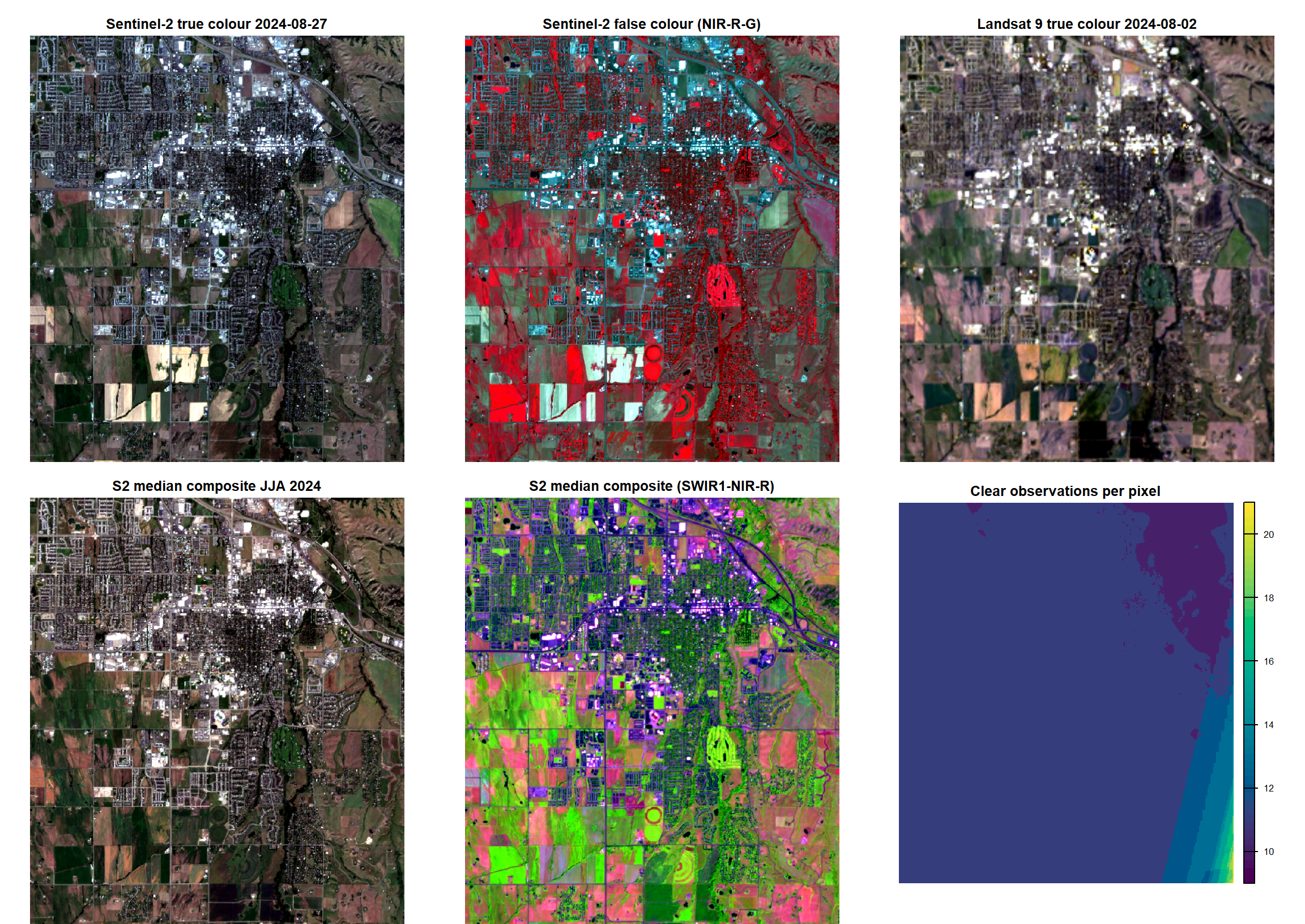
13.10.2 Thematic maps with tmap
tmap (version 4) builds maps from layers: each tm_shape() sets the data and the tm_*() calls that follow say how to draw it. Color scales are set with tm_scale_continuous(); a leading - on a palette name reverses it.
-
DEM: a hillshade from
terra::shade()is drawn in grey, then the elevation layer is drawn semi-transparently (col_alpha) on top to give a shaded-relief map. -
SAR: a reversed grey palette shows low backscatter dark (smooth surfaces, calm water, bare fields) and high backscatter bright. Buildings stand out through double-bounce scattering, and VV is generally brighter than VH. Values outside the display limits are clamped (
outliers.trunc) rather than dropped. - NDVI: computed from the median composite, \(\text{NDVI} = (\rho_{NIR} - \rho_{red}) / (\rho_{NIR} + \rho_{red})\).
hill <- shade(terrain(dem, "slope", unit = "radians"),
              terrain(dem, "aspect", unit = "radians"), angle = 40, direction = 315)
ndvi <- (s2_median[["nir"]] - s2_median[["red"]]) / (s2_median[["nir"]] + s2_median[["red"]])
names(ndvi) <- "NDVI"
aoi_line <- st_cast(aoi_utm, "LINESTRING")

map_dem <- tm_shape(hill) +
  tm_raster(col.scale = tm_scale_continuous(values = "brewer.greys"),
            col.legend = tm_legend_hide()) +
  tm_shape(dem) +
  tm_raster(col.scale = tm_scale_continuous(values = "terrain"), col_alpha = 0.55,
            col.legend = tm_legend(title = "Elevation (m)")) +
  tm_shape(aoi_line) + tm_lines(col = "black") +
  tm_title("USGS 3DEP 1/3\" DEM") +
  tm_scalebar(position = c("left", "bottom"))

map_vv <- tm_shape(s1[["VV_dB"]]) +
  tm_raster(col.scale = tm_scale_continuous(values = "-brewer.greys", limits = c(-20, 0),
                                            outliers.trunc = c(TRUE, TRUE)),
            col.legend = tm_legend(title = "VV (dB)")) +
  tm_title(paste("Sentinel-1 RTC gamma0", s1_date))

map_vh <- tm_shape(s1[["VH_dB"]]) +
  tm_raster(col.scale = tm_scale_continuous(values = "-brewer.greys", limits = c(-28, -8),
                                            outliers.trunc = c(TRUE, TRUE)),
            col.legend = tm_legend(title = "VH (dB)")) +
  tm_title("Sentinel-1 VH")

map_ndvi <- tm_shape(ndvi) +
  tm_raster(col.scale = tm_scale_continuous(values = "brewer.rd_yl_gn", limits = c(0, 0.9),
                                            outliers.trunc = c(TRUE, TRUE)),
            col.legend = tm_legend(title = "NDVI")) +
  tm_title("NDVI, S2 median JJA 2024")

tmap_arrange(map_dem, map_vv, map_vh, map_ndvi, ncol = 2)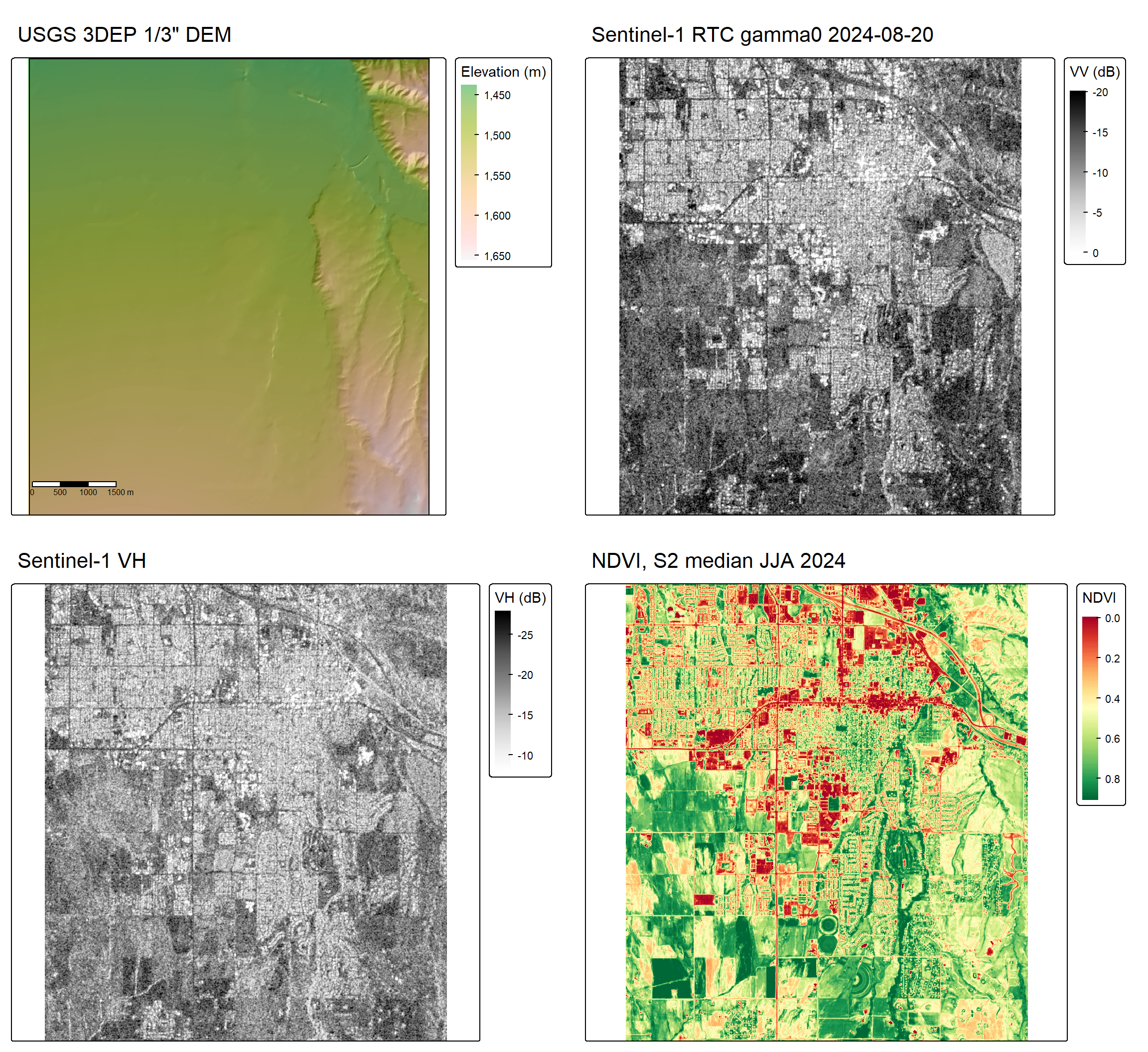
13.11 Outputs
All raster grids are written as GeoTIFFs in the output folder for the chapter and share the same UTM grid (10 m, or 30 m for Landsat), so they can be stacked directly for further analysis:
data.frame(file = list.files(out_dir, pattern = "\\.tif$"),
           size_MB = round(file.size(list.files(out_dir, pattern = "\\.tif$",
                                                full.names = TRUE)) / 1e6, 1)) |>
  gt() |>
  cols_label(file = "File", size_MB = "Size (MB)") |>
  tab_style(style = cell_text(align = "center", weight = "bold"),
locations = cells_column_labels())| File | Size (MB) |
|---|---|
| dem_3dep_10m.tif | 2.3 |
| l9_c2l2_2024-08-02.tif | 2.1 |
| s1_rtc_2024-08-20.tif | 6.1 |
| s2_l2a_2024-08-27.tif | 16.1 |
| s2_l2a_median_JJA2024.tif | 16.2 |
13.12 Concluding Remarks
We hope you found the workflow presented in this chapter useful. It is powerful to be able to find, download, preprocess, and analyze geospatial data all in the same environment.
13.13 Questions
- What spectral bands are provided by Sentinel-2 MSI?
- What are the spatial resolutions of the bands provided by Sentinel-2 MSI?
- What spectral bands are provided by Landsat 9 OLI-2?
- USGS 3DEP data are only available within the United States. What is another elevation data source that can be obtained for areas outside of the United States using
rstac? - What is the collection mode of the Sentinel-1 RTC data that were downloaded above?
- What transmitting and receiving polarizations are available for the Sentinel-1 RTC data that were downloaded above?
- List another optical data source that can be downloaded using the
rstacpackage. - Why was it not necessary to filter the Sentinel-1 SAR data in our example above for cloud cover?
13.14 Exercises
Obtain Sentinel-2 MSI and Sentinel-1 SAR data for a new study area of your choosing. Make sure not to pick an area much larger then the example used here to keep download and processing time manageable. Create visualizations of your downloaded data and write a short paragraph describing the downloaded data and the landscape patterns within your chosen extent. You do not need to generate a median composite or download elevation data.
You can use the code provided in this chapter but will need to do the following:
- Change the area of interest by editing
aoi_bbox(keep the area modest (tens of square kilometers)) - Change the date range of interest by editing
date_range - If your search does not return a near cloud-free scene, you can edit
scl_clearto be less strict; if you search is returning a large number of options, you can make this criteria more strict; to exclude snow, drop class 11 fromscl_clear - Signed URLs last about an hour; if a long session fails with HTTP 403 errors, re-run the search chunks to get fresh signatures